THE SHORT ANSWER
For most European small businesses, meetergo is the strongest all-round pick thanks to its EU hosting and built-in CRM, Calendly wins for solo consultants who just need a clean booking link, and SimplyBook.me suits salons and clinics juggling multiple staff calendars. Setmore and Picktime cover the free-tier end well.
For most European small businesses, meetergo is the strongest all-round pick thanks to its EU hosting and built-in CRM, Calendly wins for solo consultants who just need a clean booking link, and SimplyBook.me suits salons and clinics juggling multiple staff calendars. Setmore and Picktime cover the free-tier end well. The full breakdown, including GDPR posture and pricing, sits in the comparison table below.
TL;DR:
meetergo offers EU hosting and built-in CRM, making it ideal for small teams wanting integrated scheduling and lead management within GDPR compliance.
SimplyBook.me provides extensive service customization, memberships, and packages, best suited for salons and clinics with multiple staff calendars.
Calendly is quick to set up for solo users needing simple, one-to-one appointment links, but lacks multi-staff features and default EU hosting.
Free options like Setmore and Picktime serve small teams or solopreneurs with basic scheduling needs and limited budget, requiring minimal setup.
Choosing the right tool depends on staff size, booking complexity, customer data requirements, and whether GDPR-compliant EU hosting is necessary.
FlockleadsTurn More Enquiries Into WorkFlock Leads delivers qualified, exclusive leads to European home improvement and trade companies, with every enquiry checked before handover.Visit Flock Leads
What are the best appointment scheduling apps right now?
The right scheduler depends less on brand recognition and more on what your business actually does day to day. A solar installer booking site surveys needs different fields, confirmation logic and staff calendars than a hairdresser filling ten chairs a day. Here is a working shortlist of the tools worth trialling first, narrowed to those genuinely usable by EU and Belgian small businesses.
meetergo — European-built scheduler with a native CRM and EU server hosting; best for teams that want booking and lead tracking in one place. Free tier available; GDPR-friendly by design.
SimplyBook.me — Deep service management (packages, memberships, intake forms) aimed at appointment-heavy businesses like salons and clinics. Offers EU hosting options and a limited free plan.
Calendly — The most polished one-to-one booking link on the market, ideal for freelancers and consultants who mainly take single meetings rather than manage staff rosters. Free tier covers one calendar.
Setmore — A genuinely useful free plan for small teams (up to four staff members), with straightforward staff calendars and reminders.
Square Appointments — Built for businesses that already run Square for point-of-sale and payments; the calendar and till share the same customer and transaction data.
Cal.com — Open-source and self-hostable, which matters if your business wants full control over where booking data lives rather than trusting a third-party server.
YouCanBook.me — A simple, Google Calendar-first scheduler that suits solo operators who live inside Google Workspace and want minimal setup friction, as reviewers on Capterra note.
Picktime — A free-forever scheduler with core booking features, regularly cited as a solid zero-cost starting point for very small operations.
Beyond this core eight, the wider market includes Acuity Scheduling, Zoho Bookings, Appointy, Brevo Meetings, Appointlet, BookedIn, Reclaim.ai, OnTheClock, Google Calendar Appointment Scheduler, Lunacal, Zencal, Clockwise, SimplyMeet.me, Doodle, ChiliCal, HubSpot Meeting Scheduler, OnceHub, SavvyCal and Connecteam. Several of these are strong in specific niches (Reclaim.ai and Clockwise for internal calendar optimisation, HubSpot Meeting Scheduler for teams already inside HubSpot’s CRM, Doodle for group poll-style scheduling), and each gets its due in the mini-reviews further down. Not every tool on that longer list is worth a full trial for a trades business, but knowing where each sits helps you avoid wasting an afternoon testing something built for the wrong job.
How do the top scheduling tools compare on price and GDPR?
Pricing here reflects each vendor’s cheapest paid plan aimed at a small team (typically one to five staff), not enterprise tiers, and “GDPR / EU hosting” reflects whether the vendor publishes EU server locations or a standard Data Processing Agreement, based on vendor documentation and the comparison criteria used across most 2026 scheduler roundups.
Tool | Best for | Starting price / free tier | GDPR / EU hosting | Key integrations | Standout feature |
|---|---|---|---|---|---|
meetergo | Small teams wanting scheduling plus CRM | Free tier; paid plans from around €15/month per user | Yes, EU hosting | Google/Outlook calendar, video, CRM | Built-in CRM with EU servers |
SimplyBook.me | Salons, clinics, appointment-heavy services | Free tier; paid plans available | Partial, EU hosting options | Calendar sync, payments, POS add-ons | Deep service and membership management |
Calendly | Freelancers and consultants | Free tier; paid from around $10/month per seat | Partial, US-based by default | Google/Outlook/iCloud calendar, Zoom, payments | Fast, polished one-to-one links |
Setmore | Small teams on a budget | Free tier for up to 4 staff; paid plans available | Partial | Calendar sync, Zoom, Square, Stripe | Generous free staff plan |
Square Appointments | Retail and in-store services | Free tier; paid plans available | Partial, US-based | Square POS, Square payments | Native till and payments integration |
Cal.com | Developer teams, privacy-conscious firms | Free tier; self-hosted free, cloud from around $15/month | Yes, if self-hosted | Google/Outlook calendar, Stripe, Zapier | Self-hostable open-source code |
YouCanBook.me | Google Calendar users wanting simplicity | Free trial; paid from around $10/month | Partial | Google Calendar, Zoom, Stripe | Tight Google Calendar sync |
Picktime | Solopreneurs, very small teams | Free-forever core plan | Partial | Google/Outlook calendar, Zoom, Stripe | Genuinely free core features |
“Starting price” excludes setup fees and assumes monthly, not annual, billing where both are offered. “EU hosting” marked “Partial” means the vendor offers some EU infrastructure or a DPA but defaults to US-based servers unless you request otherwise, which matters if your customer data needs to stay inside the EU by contract or client requirement.
How do you choose the right scheduler for your business?
Skip the spec-sheet comparison and test against how your business actually runs. A short, realistic trial beats a feature checklist because most scheduling failures show up only once real customers, real payments and real staff calendars are involved.
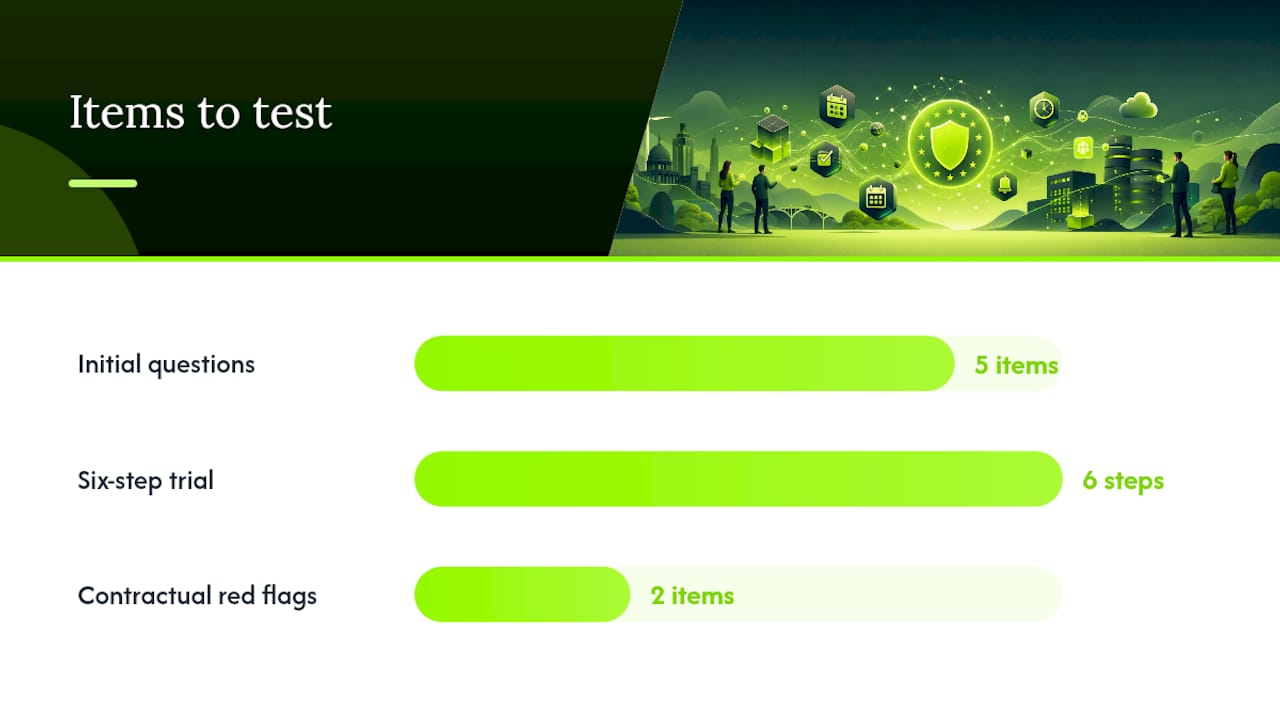
Start with five questions:
Does it match how your staff actually work? A one-person consultancy needs a booking link; a five-technician HVAC firm needs staff-specific calendars, service durations that vary by job type, and buffer time between site visits.
Is the customer booking flow usable on a phone? Most bookings now happen on mobile. Open the booking widget on your own phone and time how long it takes a stranger to book a slot.
How does it handle payments and refunds? If you take deposits for quotes or installations, check whether refunds happen inside the tool or require you to log into a separate payment dashboard.
Can you export your data and calendar history if you leave? Some tools make this trivial; others bury it behind support tickets. Ask before you commit, not after.
What happens to customer data, and where is it stored? For businesses handling EU customer data, knowing whether a vendor hosts in the EU or issues a standard DPA lowers your own compliance risk considerably.
Run this six-step test on your top two or three candidates, in 20 to 60 minutes per tool:
Create one real service with your actual pricing and duration.
Add a second staff member (or a second service type) and confirm the calendar splits correctly.
Book a test appointment from a phone, not a desktop.
Trigger a cancellation and check whether the refund or credit workflow is clear.
Check whether a confirmation and reminder email or SMS fires automatically.
Export your bookings to a spreadsheet or CRM and check the format is usable.
Pro Tip: Book the test appointment using a personal phone number, not your business number. It shows you exactly what a first-time customer sees, including any confusing confirmation text or missing intake fields you’d otherwise miss.
Watch for two contractual red flags before signing up for a paid plan: vendors that charge per staff seat with no way to downgrade mid-cycle, and vendors that don’t publish a clear data export path. Both turn a €10-a-month decision into a much costlier one if you outgrow the tool or need to switch.
Which scheduling app is best for your type of business?
Each entrant below gets a consistent snapshot: what it does, its standout feature, who should test it first, pricing, GDPR stance, and a quick pros/cons read. Not every tool needs the same depth. A few genuinely niche options get a shorter mention because there is less to differentiate.
meetergo combines appointment booking with a built-in CRM and EU server hosting, which is unusual among schedulers still defaulting to US infrastructure. It suits small teams that want lead capture and booking handled in one dashboard rather than stitching a scheduler to a separate CRM. Pricing starts with a free tier, moving to paid plans for advanced CRM features. Pros: EU hosting by default, CRM included, video call support. Cons: less polished UI than Calendly, smaller integration marketplace. Businesses already sold on keeping data inside the EU should test this one first.
SimplyBook.me is built for appointment-heavy businesses. Salons, clinics and studios get service packages, memberships, intake forms and marketing add-ons that generic schedulers don’t offer. It has EU hosting options and a limited free plan for one user. Pros: extensive service customisation, strong add-on marketplace, EU hosting available. Cons: the sheer number of add-ons makes initial setup slower, and some genuinely useful features sit behind paid modules. Multi-staff service businesses should shortlist this over a simpler tool.
Calendly remains the fastest tool to set up for a single calendar and single use case. Its polish is real: booking links load fast, timezone handling is close to flawless, and the free tier is enough for a freelancer running client calls. Pros: fastest setup of any tool tested here, excellent timezone handling, wide integration list. Cons: multi-staff scheduling requires a higher-tier plan, and EU hosting is not the default posture. It is widely recommended alongside SimplyBook.me and Setmore as one of the standard top picks, and for solo consultants it earns that place.
Setmore punches well above its price with a free plan covering up to four staff members, staff-specific calendars and automated reminders. Pros: genuinely free tier for small teams, easy staff calendar setup, decent mobile app. Cons: reporting is basic compared with paid-tier competitors, and deeper customisation needs a paid plan. Budget-conscious teams with two to four staff should trial this first.
Square Appointments only makes sense once you’re already running Square for payments or point-of-sale. Booking, till and customer records share one system, which removes a layer of reconciliation for retail and in-person service businesses. Pros: tight POS integration, no double data entry between till and calendar, solid mobile app. Cons: weaker fit for businesses not using Square already, and EU hosting is not guaranteed. Test this only if Square already runs your payments.
Cal.com is the only entrant here that can be fully self-hosted, meaning your business controls the server rather than trusting a vendor’s infrastructure. That matters for developer-led teams or firms with strict data residency requirements. Pros: open-source and auditable, self-hosting gives full data control, strong API for custom builds. Cons: self-hosting needs technical resource most trades businesses don’t have in-house, and the cloud version’s UI is less refined than Calendly’s. Firms with an in-house developer or IT contractor should test the self-hosted route first.
YouCanBook.me does one thing well: tight, low-friction Google Calendar integration. If your business already runs on Google Workspace, this scheduler slots in with minimal setup, and Capterra reviewers consistently note the sync quality as its strongest point. Pros: excellent Google Calendar sync, simple booking page builder, transparent pricing. Cons: fewer staff-management features than SimplyBook.me, and no meaningful free tier beyond a trial. Solo operators on Google Workspace should test this before anything more complex.
Picktime is the free option worth taking seriously rather than dismissing. Its core scheduling features, calendar sync, staff booking and reminders, cost nothing on the free-forever plan, which makes it a sensible first tool for a business not yet ready to pay for scheduling software. Pros: no cost for core features, calendar sync included free, decent mobile experience. Cons: fewer integrations than paid competitors, and support is slower on the free tier. Solopreneurs testing the waters should start here.
Acuity Scheduling has long been a mid-market favourite for service businesses needing package deals, intake forms and class scheduling, with pricing tiers that scale from solo use to multi-staff teams. Zoho Bookings suits businesses already inside the Zoho ecosystem, since booking data flows directly into Zoho CRM without extra setup. Appointy and BookedIn both offer solid staff-calendar features aimed at salons and clinics, sitting in similar territory to Setmore and SimplyBook.me but with smaller feature sets. Brevo Meetings comes bundled with Brevo’s marketing and email tools, useful if you already send newsletters or automated emails through that platform. Appointlet integrates tightly with HubSpot and Salesforce, making it a reasonable pick for sales-led teams rather than trades businesses. OnTheClock is primarily a time-tracking tool with scheduling bolted on, better suited to workforce management than customer-facing booking.
Reclaim.ai and Clockwise both focus on optimising internal calendars and meeting time for teams, rather than customer-facing appointment booking, so they solve a different problem to the rest of this list. Google Calendar Appointment Scheduler works as a free, built-in option for anyone already paying for Google Workspace, though it lacks the staff management and payment features of dedicated tools. Lunacal, Zencal, SimplyMeet.me, ChiliCal and SavvyCal are newer entrants competing directly with Calendly on link-based scheduling, each with modest feature differences (SavvyCal’s shared availability links stand out) but none yet matching the integration depth of the established names. Doodle remains the standard tool for group poll-style scheduling rather than single-service bookings. HubSpot Meeting Scheduler and OnceHub both suit sales teams already running HubSpot or a dedicated sales CRM. Connecteam is broader workforce-management software with scheduling as one module among many, better suited to shift-based staffing than customer appointment booking.
Our take on scheduling tools and the lead pipeline
We watch a lot of contractor booking flows, and the pattern that breaks conversion most often has nothing to do with which app you pick. It’s what happens between a lead landing and a slot being confirmed. A homeowner fills in an enquiry form, waits two days for a callback, and books elsewhere in the meantime.
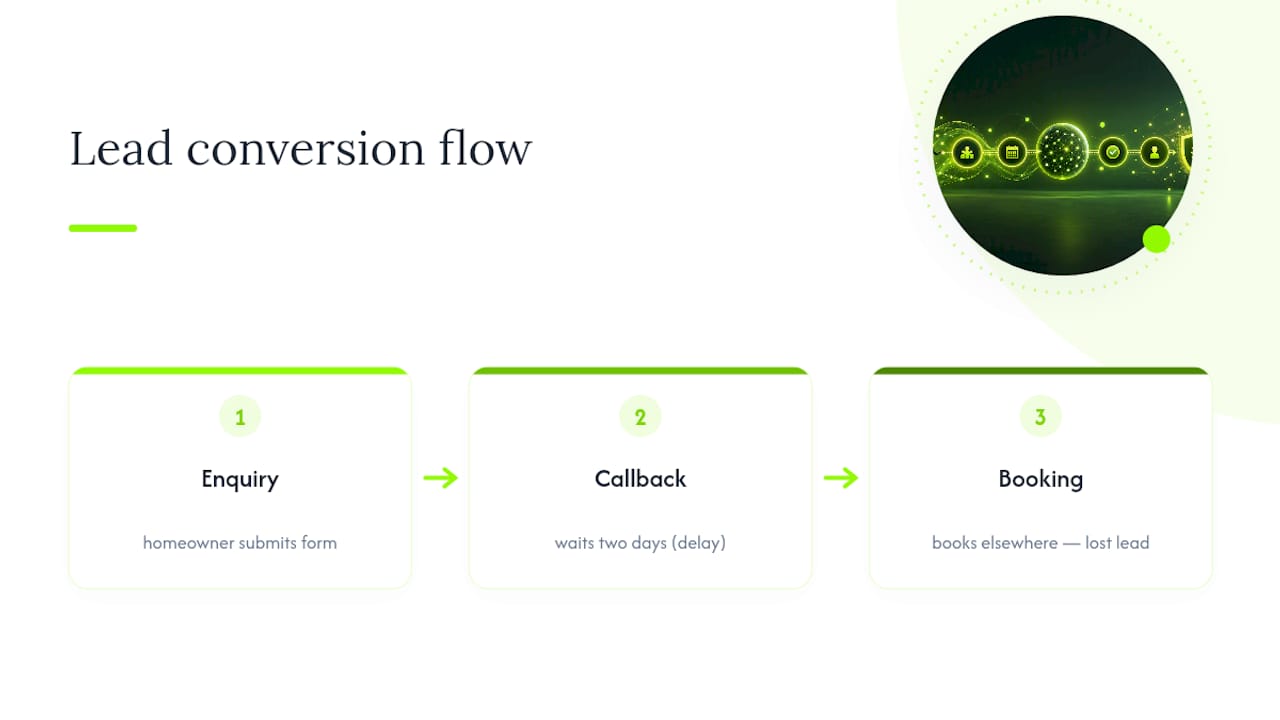
The workflow that actually works looks like this: lead comes in, the scheduler sends an instant confirmation with a real time slot (not “we’ll call you”), intake fields capture the job details up front (property type, rough scope, postcode), and the booking lands directly in a CRM your team can act on. We’ve written before about how fast a new lead needs a response to convert, and the same urgency applies to scheduling: every hour of delay between enquiry and confirmed appointment costs you bookings.
The pitfalls we see most often are simple: no immediate confirmation, so the customer assumes the form failed; missing intake fields, so a technician turns up unprepared; and unclear refund or rescheduling terms buried in a confirmation email nobody reads. Fixing these is often a configuration issue, not a tool issue.
— Flock Leads
Want qualified leads instead of just a better calendar?
A better scheduler fixes how you book appointments. It doesn’t fix the gap before that, getting enough of the right enquiries into your calendar in the first place. That’s a separate problem, and it’s the one Flockleads actually solves.
Rather than another subscription you configure yourself, Flockleads runs paid campaigns across Google, Meta, LinkedIn and TikTok on your behalf, qualifies every enquiry before it reaches you, and delivers it exclusively, never resold to three competitors chasing the same customer. You pay per lead, with quality criteria agreed upfront and a replacement policy if a lead doesn’t meet them. For contractors in Belgium, the Netherlands, Ireland and the UK who’ve got the booking side sorted but still spend evenings chasing enough enquiries to fill next week’s calendar, that’s the piece a scheduling app can’t provide on its own. Every engagement starts with a free audit of your current lead flow and website conversion, so you can see where enquiries are leaking before committing to anything. Read how lead generation actually works for contractors in 2026 and book your free audit to find out what a properly qualified lead pipeline could add to your calendar.
Sources
European Scheduling Software 2026: 12 Best GDPR-Compliant Tools
8 best appointment scheduling software tools in 2026
Frequently asked questions
What is the best appointment calendar app?
For most European small businesses, meetergo leads on EU hosting and built-in CRM, while Calendly remains the fastest to set up for a single calendar and simple one-to-one bookings.
What is better than Calendly?
For multi-staff service businesses, SimplyBook.me offers deeper staff and service management; for EU data residency, meetergo and self-hosted Cal.com both offer stronger GDPR posture than Calendly’s default setup.
What is the best calendar app for scheduling appointments?
It depends on staff numbers: Setmore’s free plan covers up to four staff calendars, while SimplyBook.me suits larger, appointment-heavy teams needing packages and memberships.
What is the best free app for booking appointments?
Picktime offers a genuinely free-forever core scheduling plan, and Setmore’s free tier covers small teams of up to four staff members.
Do scheduling apps handle GDPR compliance automatically?
No. A vendor offering EU hosting or a standard Data Processing Agreement lowers your compliance risk, but you’re still responsible for how you collect and store customer data within the tool.
Can I connect a scheduling app to my existing CRM?
Most major tools, including meetergo, SimplyBook.me and Cal.com, offer calendar and CRM integrations or export options; check the specific integration list before committing, since depth varies significantly between vendors.
How much does a decent scheduling app cost for a small team?
Budget-tier options like Picktime and Setmore’s free plan cost nothing for small teams, while paid plans across the shortlist above generally start between roughly €10 and €15 per user, per month.
Should a contractor use a scheduling app or a managed lead service?
A scheduling app organises appointments you already have; it doesn’t generate new enquiries. Businesses with enough bookings need a good scheduler, but those short on enquiries typically need a lead pipeline first, which is where a managed service like Flockleads fits.
NEED A CLEARER PLAN?
Let’s turn your next move into momentum.
Talk to us →