THE SHORT ANSWER
Route leads in HubSpot using a workflow that checks the Score property, applies territory or product filters, then triggers Rotate record to owner with an SLA-based failover branch for anything unclaimed after a short period. That single combination handles most speed-to-lead problems teams face, and you can build a working version of it today.
Route leads in HubSpot using a workflow that checks the Score property, applies territory or product filters, then triggers Rotate record to owner with an SLA-based failover branch for anything unclaimed after a short period. That single combination handles most speed-to-lead problems teams face, and you can build a working version of it today.
Before you touch a live workflow, do these three things:
Enable one minimal workflow scoped to a single form or lead source, not your entire pipeline.
Set a Score property threshold (even a rough one) so junk submissions never reach a rep’s queue.
Add one fallback owner or queue for leads that don’t match any branch, so nothing sits unassigned.
Confirm your own seat permissions for owner assignment and test the workflow against a handful of sample contacts before you turn it loose on real form submissions. Skipping that step is the single most common way teams accidentally route hot leads to a disabled user or an empty queue.
Key Takeaways
Reliable HubSpot lead routing combines Score-based qualification, layered criteria like territory and product fit, and SLA-based failover so no lead sits unclaimed for long.
Point | Details |
|---|---|
Start with Score and territory | Layer these two criteria first before adding product-fit or capacity rules. |
Always build a fallback branch | Every workflow needs a backup owner or queue for leads that match no rule. |
Test before publishing | Preview assignment output on sample contacts before rolling out to live traffic. |
Track speed-to-lead closely | Sample timestamps from form submission to first outreach to catch slow branches. |
Pair routing with steady volume | A tool like Flockleads can supply consistent, qualified leads that feed directly into your HubSpot routing workflow. |
What Is HubSpot Lead Routing and Why Speed Matters
Lead routing is the process of automatically assigning an incoming lead to the right rep, queue, or team based on rules like territory, product interest, or lead score, instead of a manager manually eyeballing a list every morning. In HubSpot, that means using workflows to read a contact’s properties and act on them the moment a form gets submitted, a chat starts, or a deal gets created.
Manual assignment works fine at low volume. It breaks the moment your inbound flow grows past what one person can triage by hand, and HubSpot’s own guidance frames automated routing as the fix for that bottleneck rather than a nice-to-have layer on top of it. Response time is the real cost of getting this wrong: leads that sit in a shared inbox for hours go cold, and reps waste time fighting over who owns what.
HubSpot’s blog cites an example where a company that layered product expertise, geography, and rep capacity into its routing logic cut response time by 90 percent after moving off manual assignment. That’s not a marginal improvement. It’s the difference between a rep calling a lead while they’re still on your pricing page versus calling three days later when they’ve already talked to two competitors.
Inside HubSpot, routing logic lives in a few specific places:
Workflows — the engine that evaluates enrollment triggers and executes branching logic.
Score property — a numeric field (often built from predictive scoring) used to qualify or prioritize leads before routing.
Owner property — the field a workflow updates via Set [object] owner or Rotate record to owner actions.
Which Routing Criteria Should You Use?
Most teams default to round-robin because it’s the easiest thing to configure. It’s also the wrong default for a lot of go-to-market models, because treating every lead identically ignores everything you already know about them.
Here’s how the common criteria map to real scenarios:
Lead score — use when you have enough form and behavioral data to separate high-intent leads from tire-kickers; route the top tier to your best closers first.
Geography or territory — essential once you have region-specific reps, local compliance needs, or time-zone-based follow-up expectations.
Product interest — critical for multi-product companies; a lead asking about your enterprise SKU shouldn’t land with a rep who only sells the entry tier.
Account size — separates SMB-motion reps from enterprise AEs who need longer sales cycles and different messaging.
Language — non-negotiable the moment you sell across language markets; route to a fluent rep or lose the lead in translation delays.
Existing account ownership — always check this first; a new contact at an existing account should go to the current owner, not a random queue.
Rep capacity — throttles volume to whoever actually has bandwidth, rather than whoever is next in a static rotation.
Source or channel — paid search leads often behave differently than referral leads, and some teams route by channel to match rep expertise with lead behavior.
Layering criteria (existing owner, then territory, then product, then score) produces sharper matches than any single rule. Single-criteria round-robin is faster to build and fine for early-stage teams with one product and one motion, but it stops scaling the moment your business gets more complex.
Pro Tip: When lead score and rep capacity conflict, check capacity first. A perfectly scored lead sitting in an overloaded rep’s queue for six hours does worse than an average lead that gets a callback in ten minutes.
How to Build a Working Routing Workflow in HubSpot
This is a minimal setup that a sales or ops manager can build directly or hand to an admin with clear specs.
Before you start: confirm you have the seat and permission level required to assign owners, since HubSpot restricts owner assignment to users with the right access. Without it, your workflow will run but silently fail to set an owner.
Build your qualifying filters. Create an Active List or workflow enrollment trigger based on Score property thresholds, so only leads above your minimum bar enter the routing logic. HubSpot Academy recommends Score property and Active Lists as the standard qualification layer before assignment.
Create the workflow. Set your enrollment trigger (form submission, lifecycle stage change, or record creation), then add If/Then branches for territory, product interest, or account size. Inside each branch, use Set [object] owner for a specific named owner or Rotate record to owner for a pool of reps.
Add notifications and a handoff task. Attach a Slack alert, internal email, or a HubSpot task so the assigned rep knows immediately, not the next time they happen to check their queue.
Add SLA-based failover. Build a delay step (say, 30 minutes) followed by a check on whether the lead has been contacted. If not, reroute to a fallback rep or manager queue automatically.
Publish and test. Run test enrollments against a handful of sample contacts and preview the assignment output before rolling this out to live traffic, a step HubSpot’s own documentation treats as standard practice, not optional QA.
Pro Tip: Clone your base workflow once it works, then adjust only the branch filters for each territory or product line. Rebuilding from scratch for every new segment is how routing logic drifts out of sync across teams.
Advanced Routing Patterns When Round-Robin Isn’t Enough
Simple rotation runs out of steam once you’re managing multiple products, regions, or a mix of inbound and outbound motions. A few patterns cover most of what teams need beyond that point:
Weighted distribution sends more leads to your top performers instead of splitting evenly, useful when rep tenure or close rate varies widely.
Capacity-based routing checks a rep’s current open deal count or task load before assigning, preventing pileups on your strongest closer.
Product-specialist routing matches lead intent (from form fields or page behavior) to the rep who actually knows that product line.
Account ownership overrides bypass every other rule when a contact belongs to an existing account, always routing back to the current owner.
Building this in HubSpot means sequencing If/Then branches so the highest-priority check runs first. Existing ownership should almost always be branch one, since misrouting an existing customer’s lead to a stranger is a worse outcome than any scoring miss.
Failover logic is what separates a routing system that looks good in a demo from one that survives a real quarter. Every rule needs a fallback: a backup rep, a shared queue, or a manager alert for anything that falls through. HubSpot recommends SLA timers that automatically reroute when a primary assignee hasn’t acted within a set window.

A workable SLA structure looks like this: SDRs get a short time to accept or claim a new lead before it reroutes to a backup SDR; AE handoffs (after SDR qualification) get a longer window to respond, since that step usually involves scheduling rather than an instant first touch. Enforce both timers directly inside the workflow using delay steps and conditional checks. Enforce both timers directly inside the workflow using delay steps and conditional checks.
Where Zapier and Enrichment Tools Fit In
HubSpot’s native workflows handle most routing needs on their own. You reach for something external when volume gets heavy enough that queue logic becomes unwieldy, when leads need to route across more than one CRM, or when you need enrichment data HubSpot doesn’t natively calculate.
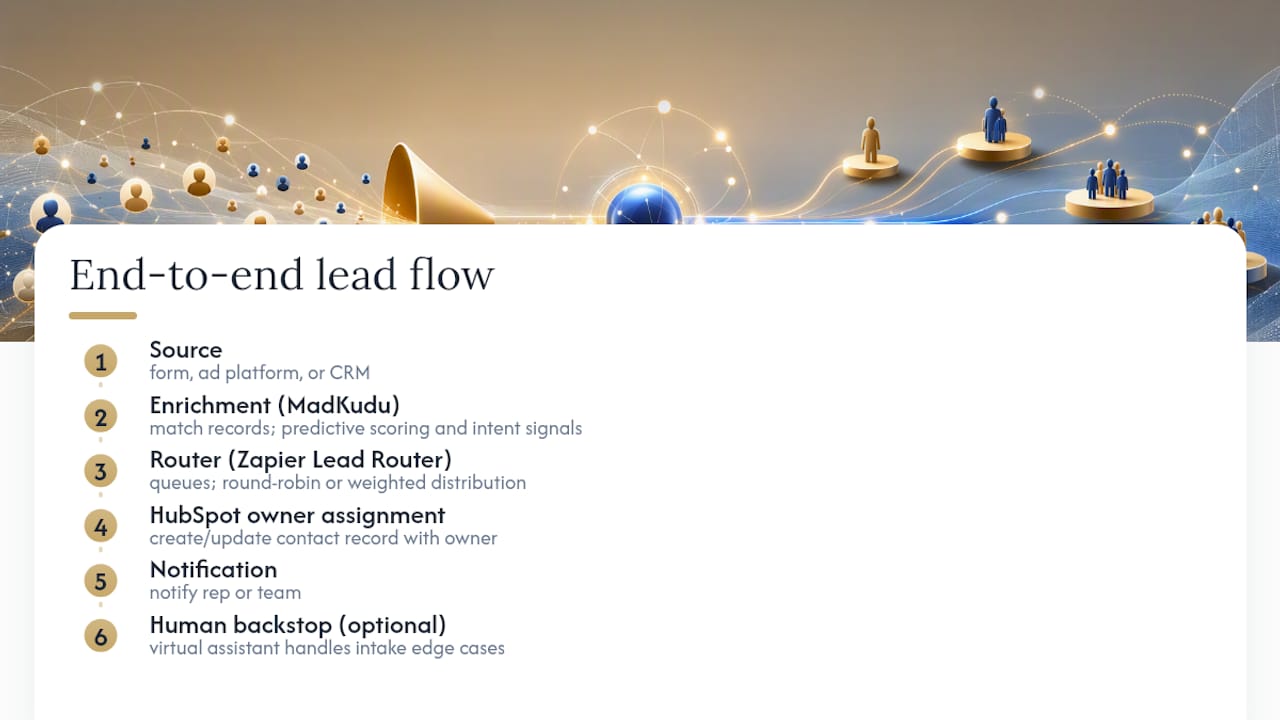
That’s the gap Zapier Lead Router fills. It organizes reps into queues and routers, supports round-robin or weighted distribution outside HubSpot’s own logic, and passes the final assignment back into HubSpot to create or update the contact record with the correct owner. Teams juggling multiple intake sources, or routing the same lead pool across separate systems, get more flexibility here than native workflows alone provide.
Enrichment is the layer that happens before any of this. Tools like MadKudu apply predictive scoring and intent signals to a lead before it ever hits a routing rule, so your Score property reflects more than just form-fill behavior. Zapier’s own automation documentation describes this same pattern: capture the lead from a form, ad platform, or CRM, match it against existing records to avoid duplicates, enrich it, then route.
The full flow, end to end, looks like: source → enrichment/scoring → router → HubSpot owner assignment → notification. Skipping the enrichment step doesn’t break routing, but it means your rules are only as good as whatever raw data the lead happened to submit.
Pro Tip: If you’re outsourcing lead intake triage or need a human backstop for edge cases your rules don’t catch, a virtual assistant handling lead intake tasks can cover the gap while you refine automated logic.
Metrics That Tell You If Routing Is Actually Working
Routing rules feel done the day you publish them. Whether they’re actually working is a separate question, and it only shows up in the numbers.
Metric | Definition | How to capture in HubSpot |
|---|---|---|
Routing time | Minutes between lead creation and owner assignment | Timestamp property set at form submission vs. workflow-set owner timestamp |
Acceptance rate | Percentage of assigned leads a rep engages with within SLA | Custom property logged when first outreach task is completed |
SLA breach rate | Percentage of leads that hit the failover timer before contact | Count of workflow enrollments that reach the reroute branch |
Routing accuracy | Percentage of leads assigned to the correct rep/territory on first pass | Manual audit sample or reassignment-count property |
Conversion by assignment path | Close rate compared across routing rules or reps | Deal properties filtered by original routing branch |
Speed-to-lead is the metric most worth watching closely, and it’s simple to calculate once you have the right timestamps: form submission time, owner-assigned time, and first-outreach-logged time. Sample a few dozen leads a week across these three points and you’ll spot slow branches long before they show up in your close rate.
Pro Tip: Don’t rely on average routing time alone. A workflow with a 4-minute average and a handful of 6-hour outliers has a broken branch somewhere, and the average will hide it.
Fixing the Most Common HubSpot Routing Failures
Unassigned leads are almost always one of three things: a missing property value the branch logic depends on, a workflow enrollment gap where the trigger didn’t fire, or a permissions issue where the target user’s seat can’t be set as owner. Check in that order.
Duplicate records cause a different kind of mess: two workflow instances assigning two different owners to what’s really the same person. Zapier’s guidance on lead routing automation recommends matching incoming leads against existing CRM records before assignment runs, which cuts this problem off before it starts.
When Rotate record to owner doesn’t behave as expected, run through this checklist:
Check the branch order. If an earlier If/Then step already set an owner, a later rotate action may skip the record entirely depending on your overwrite settings.
Confirm the rotation pool includes active, correctly seated users. A deactivated or downgraded user still listed in the pool will absorb leads it can never actually work.
Verify the enrollment trigger fired at all. A record that never entered the workflow was never eligible for rotation in the first place.
Look for existing-owner overwrite rules that might be silently protecting a record from reassignment.
Test with a fresh sample contact and preview the output before assuming the logic itself is broken.
Run this list before opening a support ticket. Most “broken” routing turns out to be a branch order problem, not a platform bug.
Copy-Paste Workflow Templates to Start With
Three templates cover most teams’ starting needs. Build the simplest one that matches your current motion, then add complexity as volume or product lines grow.
Template A: SMB round-robin. Trigger on form submission, no scoring gate, straight into Rotate record to owner across your SMB rep pool, with an instant Slack notification to the assigned rep.
Template B: Score-based SDR/AE split. Trigger on form submission, branch on Score property (above threshold goes to AE pool, below goes to SDR pool for qualification), with a 15-minute SLA failover to a backup queue.
Template C: Territory plus product match. Trigger on form submission, first branch checks existing account ownership, second branch checks territory, third branch checks product-interest field, with a general fallback queue for anything that doesn’t match cleanly.
Before rolling any of these live, run through a short checklist: test enrollments with sample contacts, preview the assignment output, confirm accept/reject behavior on notifications, and watch the first 24 hours closely for SLA breaches. That first day tells you more about whether your branch logic actually holds up than any amount of pre-launch review.
Should You Optimize Routing or Buy More Leads?
Better routing gets you more out of the leads you already have. It doesn’t create leads that don’t exist. At some point, the question shifts from “how do we route faster” to “do we actually have enough volume to route in the first place.”
The trade-offs come down to a few factors: how much control you need over lead quality, how predictable your volume needs to be, what you’re willing to pay per lead versus the ROI you’re getting, and whether your team has the capacity to work leads once they arrive. A perfectly tuned routing workflow feeding a trickle of leads solves the wrong problem.
Before deciding to buy leads instead of relying purely on inbound, run through an operational checklist: do you have a genuine volume gap, how fast do you need to scale, and what conversion benchmark are you working from today.
Routing optimization and lead volume are two different levers, and pulling only one leaves the other unaddressed. A team with airtight SLAs and a flawless failover chain still misses quota if there simply aren’t enough qualified leads entering the pipeline to route in the first place. Capacity planning has to account for both sides at once.
What Ops Managers Get Wrong the First Time They Build This
The instinct when building routing for the first time is to design for every edge case up front, territory splits, product matrices, capacity throttling, all before the first workflow ever goes live. That’s backwards. Score and territory rules cover the majority of routing needs on their own, and everything else can wait until you have real data showing where the gaps actually are.
Governance matters more than most teams expect going in. Workflows multiply fast, and without a naming convention and a change-control process, you end up with three overlapping “lead routing” workflows within a few months, none of which anyone fully trusts. Name workflows by function and date, document who can edit branch logic, and require a second set of eyes before any production routing rule changes.
A common trap: a team builds an owner-rotation pool, then someone leaves the company or moves teams, and nobody removes them from the rotation. Leads keep routing to a seat nobody’s checking. The fix isn’t complicated, it’s a quarterly audit of every rotation pool against your current active user list, but almost nobody schedules it until leads start going missing.
Prioritize the two or three rules that touch the most volume, ship them, watch the metrics for two weeks, then add complexity. Trying to launch the finished version on day one is how routing projects stall for months instead of shipping in a week.
When Managed Lead Delivery Complements Your Routing Setup
Routing solves what happens after a lead exists. It does nothing for teams whose real problem is that not enough qualified leads are hitting the top of the funnel in the first place. Flockleads exists for that second problem: automated B2B lead generation across Meta, LinkedIn, Google, and TikTok campaigns, with qualifying forms and instant CRM delivery, so your carefully built HubSpot routing has consistent, qualified volume to actually work with.

If you’re evaluating a supplier to feed your routing workflows, look for a few specifics: does the integration deliver leads directly into your CRM instead of a spreadsheet, does it qualify leads before handoff instead of dumping raw form fills, is there an SLA on delivery timing, and can you get exclusivity instead of sharing the same lead with three competitors. Flockleads is built around instant CRM delivery and weekly campaign optimization, which means leads arrive ready for your existing HubSpot workflow to route the moment they land, no manual import step in between.
See how this works in practice for contractor lead generation, or start with a free audit to see what qualified volume would look like feeding directly into your current routing setup.
Sources
Test every new or edited workflow in a sandbox list or against a small sample of contacts first. Skipping that step is how a single misconfigured branch ends up rerouting an entire day’s worth of leads before anyone notices.
Frequently asked questions
What is lead routing?
Lead routing is the automated process of assigning an incoming lead to the right rep, team, or queue based on rules like lead score, territory, or product interest, instead of a person manually sorting a shared inbox.
Does HubSpot have a lead generation tool?
HubSpot offers native forms, landing pages, and ad tracking for capturing leads, but generating consistent inbound volume at scale typically requires paid campaigns or a managed service like Flockleads feeding qualified leads directly into your HubSpot workflows.
Can HubSpot track leads?
Yes. HubSpot tracks lead activity through contact timelines, lifecycle stage properties, and the Score property, all of which can feed directly into routing workflow logic.
What does a lead mean in HubSpot?
A lead in HubSpot is typically a contact record that has shown enough engagement, form fills, page visits, or a qualifying score, to be considered ready for sales follow-up rather than pure marketing nurture.
When should I use Zapier Lead Router instead of native HubSpot workflows?
Use Zapier Lead Router when you need complex queue logic, weighted distribution beyond HubSpot’s native rotation, or routing across multiple CRMs, since it passes the final assignment back into HubSpot once the routing decision is made.
NEED A CLEARER PLAN?
Let’s turn your next move into momentum.
Talk to us →