THE SHORT ANSWER
CRM lead management integration is the process of connecting your lead capture sources directly to your CRM so every new lead creates or updates a record automatically, without manual data entry. Done right, it cuts response time from hours to minutes, eliminates duplicate records, and gives sales teams a single source of truth for every prospect.
CRM lead management integration is the process of connecting your lead capture sources directly to your CRM so every new lead creates or updates a record automatically, without manual data entry. Done right, it cuts response time from hours to minutes, eliminates duplicate records, and gives sales teams a single source of truth for every prospect. B2B marketers who integrate CRM lead management gain a measurable edge: leads routed and followed up faster close at higher rates. This article covers the exact workflow, tools, and best practices to build that system in 2026.
What does it take to integrate CRM lead management?
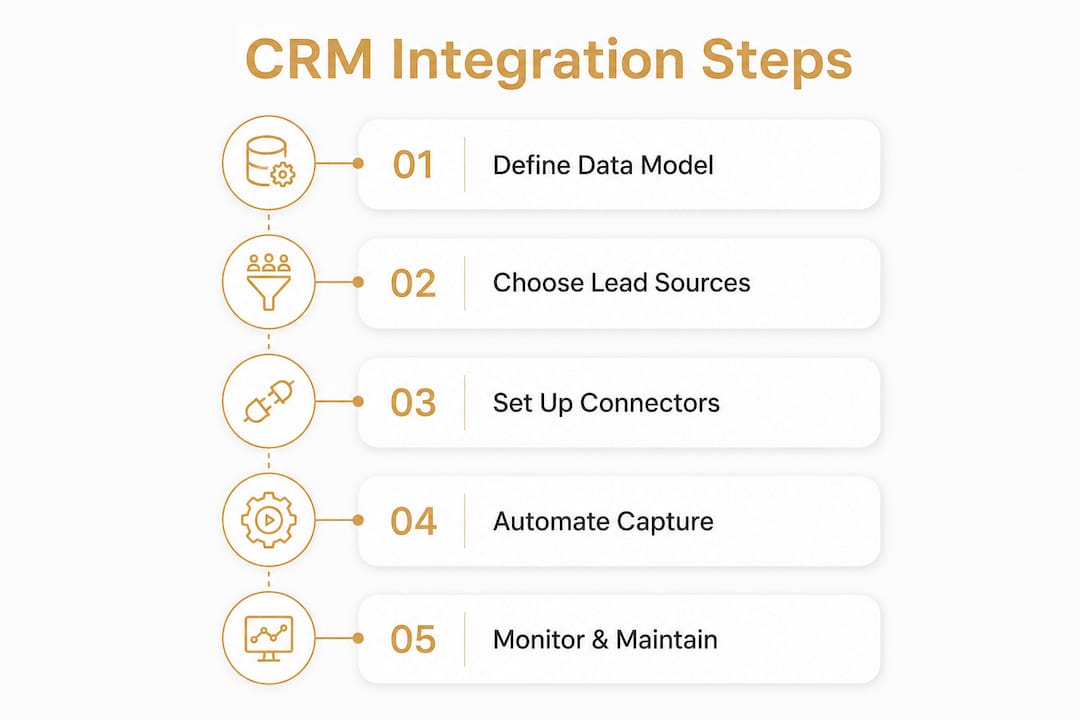
Successful CRM lead integration starts with decisions made before you write a single line of code or configure a single connector. The most common mistake is jumping straight to tools without defining your data model first.
The first decision is which CRM objects you will use. Most platforms offer Lead, Contact, Account, and Opportunity as separate objects. You need to decide whether an inbound inquiry creates a Lead record first or goes straight to Contact and Account. That choice determines your deduplication logic, your routing rules, and how your sales team works the pipeline. Teams that define CRM data objects and upsert keys early avoid permanent data debt and integration failures.

Choosing your integration method
Three integration methods cover most B2B use cases. Each trades simplicity for flexibility.
Native integrations connect your form or ad platform directly to your CRM through a built-in connector. Setup takes minutes. The tradeoff is limited control over data transformation before the record is created.
Middleware platforms sit between your lead source and your CRM. They add preprocessing steps like lead scoring, enrichment, and data validation. Middleware solutions add valuable preprocessing capabilities before CRM insertion, at the cost of additional technical and subscription complexity.
Webhook or API-based integrations give you full control. Your lead source fires an HTTP POST to an endpoint you control. You normalize, deduplicate, and route the data before it ever touches your CRM.
What tools do you need?
The table below maps integration method to typical use case and cost range.
Integration method | Best for | Approximate cost |
|---|---|---|
Native connector | Single lead source, simple field mapping | Often included in CRM plan |
Middleware platform | Multiple sources, enrichment needed | $16/month and up |
Custom webhook or API | Complex routing, full data control | Developer time + hosting |
Specialized lead-to-CRM tools can sync leads from platforms like Facebook, LinkedIn, TikTok, and Google into your CRM in under 60 seconds, starting at $16/month. That speed matters because lead response time is one of the strongest predictors of conversion.
Small teams also have a structural advantage here. Businesses with fewer than 50 employees benefit most from CRMs with built-in lead management, since disconnected systems create productivity loss that compounds quickly at small headcounts.
How do you set up an automated lead capture workflow?
A reliable lead-to-CRM pipeline follows five steps in sequence. Skipping any one of them creates the data problems that sales teams complain about most: duplicates, missing owners, and stale records.
Capture the lead event. Use a webhook or API trigger the moment a form is submitted or an ad lead form is completed. Avoid batch imports. Real-time capture keeps your CRM current and your sales team responsive.
Normalize the data. Standardize phone formats, capitalize names consistently, and map source field names to your CRM field names. A lead from a Facebook Lead Ad uses different field labels than a HubSpot form. Normalization makes them identical before they enter your CRM.
Deduplicate using a unique key. Email address is the most reliable deduplication key for B2B leads. When a record with that email already exists, run an upsert: update the existing record rather than creating a duplicate. A complete integration workflow includes data normalization, field mapping, deduplication by email, and automated owner assignment.
Apply routing and assignment rules. Assign leads to the right sales rep based on geography, product interest, company size, or round-robin rotation. Hard-code the rules in your workflow logic, not in your CRM UI, so they survive CRM updates. Leads routed automatically can reach the right owner within 10–70 seconds of submission.
Confirm and log the outcome. Write the CRM record ID and timestamp back to a log, whether that is a Google Sheet, a database row, or a monitoring dashboard. This audit trail is your first diagnostic tool when something breaks.
Pro Tip: Set a target of under 60 seconds from lead submission to CRM record creation. If your workflow regularly exceeds that, the bottleneck is almost always in the normalization or deduplication step, not the CRM API itself.
What are the biggest challenges in CRM lead integration?
The technical steps are straightforward. The operational discipline required to maintain them is where most teams fall short.
Over-automation is a real risk. The goal of CRM integration is to free your sales reps for conversations, not to replace those conversations with automated sequences. The best CRM integrations reduce busywork so sales can focus on relationships. When every touchpoint is automated, prospects feel it. Build your workflow to handle data, not to handle people.
Consent and timestamp data must travel with the lead. Every lead record should carry the opt-in timestamp, the consent language version, and the source channel. CRM API integration failures often stem from ignoring consent signals and timestamps. Including these from day one avoids legal and operational problems that are expensive to fix retroactively.
Effective lead management is a system of record that coordinates the full lifecycle from first touch to closed deal. It requires operational discipline well beyond simple automation. The teams that treat CRM integration as a revenue function, not an IT project, are the ones that build pipelines that actually hold up under pressure.
Data debt compounds fast. A messy field mapping decision made in week one becomes a migration project in year two. Commit to a clean data model before you go live. Define which fields are required, which are optional, and what happens when a source sends a field your CRM does not recognize.
Multiple lead sources need a single entry point. When you have leads coming from web forms, LinkedIn Lead Gen Forms, Google Ads, and trade show badge scans, the temptation is to build a separate workflow for each. Resist it. A single canonical webhook URL that normalizes, deduplicates, and routes leads from all sources simplifies maintenance and avoids disconnected workflows that drift out of sync.
Pro Tip: Monitor two sets of KPIs: infrastructure metrics like webhook error rates and API response times, and business metrics like lead-to-contact rate and time to first call. Infrastructure health does not always predict business outcomes, and vice versa.
How do you maintain and improve your CRM lead system over time?
A CRM integration is not a set-and-forget project. Lead sources change their APIs. CRM vendors update their field schemas. Sales teams reorganize territories. Your integration needs to survive all of that.
The maintenance practices that matter most are:
Comprehensive logging. Every webhook event should be logged with its payload, the CRM response, and a success or failure flag. A Google Sheets backup of raw lead data costs nothing and has saved countless teams during CRM outages.
Scheduled schema reviews. When your CRM vendor releases an update, check whether any field names, object relationships, or API endpoints changed. Set a calendar reminder for quarterly reviews.
Credential rotation. API keys and OAuth tokens should be rotated on a schedule. Store them in a secrets manager, not in your workflow configuration as plain text.
Assignment rule audits. Sales territories change. Reps leave. New product lines launch. Review your routing rules every quarter with both the sales manager and the marketing ops lead.
The table below shows which signals indicate your integration needs attention.
Signal | Likely cause | First action |
|---|---|---|
Duplicate records increasing | Deduplication key mismatch | Audit upsert key logic |
Leads missing owner assignment | Routing rule gap or rep removed | Review assignment rules |
Webhook error rate above 1% | API change or auth failure | Check logs and rotate credentials |
Lead-to-contact rate dropping | Data quality or routing delay | Run field mapping audit |
Treating CRM integration as a lifecycle system of record, rather than a one-time setup, is what separates teams with clean pipelines from teams constantly firefighting bad data. Schedule a monthly review with both sales and marketing to surface problems before they become crises.
Key Takeaways
Integrating CRM lead management requires a clean data model, real-time capture, and disciplined maintenance to turn lead flow into a reliable revenue system.
Point | Details |
|---|---|
Define your data model first | Choose CRM objects and upsert keys before configuring any integration tool. |
Capture leads in real time | Webhook-based capture delivers leads to your CRM in under 60 seconds. |
Use one canonical entry point | A single webhook for all lead sources prevents workflow sprawl and data drift. |
Carry consent data with every lead | Include opt-in timestamps and source channel on every CRM record from day one. |
Monitor business and infrastructure KPIs | Track both webhook error rates and lead-to-contact rates to catch problems early. |
Why I think most teams underestimate CRM integration
Most B2B teams treat CRM integration as a technical task they hand off to a developer or a marketing ops contractor. That framing is the root cause of most integration failures I have seen.
Integration is a revenue function. The moment a lead enters your CRM incorrectly, without an owner, without consent data, or as a duplicate, you have already lost ground. The sales rep who gets that record will either ignore it or waste time cleaning it up. Neither outcome moves the pipeline forward.
The teams that get this right treat the integration layer the same way they treat their sales process: with documented rules, regular reviews, and clear ownership. They also resist the urge to automate everything. Automation handles data. People handle relationships. The best lead management workflows I have seen are the ones where a sales rep never has to think about where a lead came from or who owns it. That cognitive load is gone, and they spend their time on calls.
Small teams have an advantage here that they rarely use. A CRM with built-in lead management and a single webhook integration is genuinely enough to run a tight B2B pipeline. You do not need a six-figure middleware stack. You need clean decisions made early, and the discipline to maintain them. If you are building this from scratch, start with your paid traffic lead flow before you tackle organic or outbound. Paid traffic has the clearest data shape and the fastest feedback loop.
— Mieke
How Flockleads handles lead flow for B2B teams
Flockleads builds engineered lead flow for B2B service businesses. That means your leads from LinkedIn, Facebook, Google, and your own web forms arrive in your CRM automatically, normalized, deduplicated, and assigned to the right rep.

The Flockleads system handles the full capture-to-CRM pipeline so your sales team works qualified, correctly routed leads from the moment they log in. No manual imports, no ownership gaps, and no data cleanup before the first call. If you want to see how the workflow is built and what it looks like in practice, the Flockleads project showcase walks through real client setups. For a full overview of what the service covers, visit flockleads.com.
Frequently asked questions
What is CRM lead management integration?
CRM lead management integration is the automated connection between your lead sources and your CRM, so new leads create or update records without manual entry. It covers capture, normalization, deduplication, and assignment in a single workflow.
How fast should leads reach my CRM after submission?
Leads should reach your CRM within 60 seconds of submission. Specialized tools can sync leads from ad platforms to CRM in under 60 seconds, and webhook-based workflows typically complete the full process in 10–70 seconds.
What is the biggest risk in CRM lead integration?
The biggest risk is data debt from a poorly defined data model. Teams that skip defining CRM objects, upsert keys, and ownership rules early end up with duplicate records and broken routing that require expensive migrations to fix.
Do I need middleware to integrate CRM lead management?
Not always. Native connectors work well for single lead sources with simple field mapping. Middleware adds value when you need enrichment, scoring, or complex data transformation before records enter your CRM.
How do I handle leads from multiple sources?
Use a single canonical webhook as your central intake point for all lead sources. Normalize and deduplicate at that layer before routing to your CRM. This approach prevents disconnected workflows and keeps your maintenance overhead low.
NEED A CLEARER PLAN?
Let’s turn your next move into momentum.
Talk to us →