THE SHORT ANSWER
Use Meta lead forms when you need fast, cheap, mobile-first volume for a simple offer, and use landing pages when the sale is complex, expensive, or slow to close. The trade-off is blunt: lead forms lower your cost per lead but usually lower lead quality too, while landing pages cost more upfront but tend to produce better sales-qualified leads.
Use Meta lead forms when you need fast, cheap, mobile-first volume for a simple offer, and use landing pages when the sale is complex, expensive, or slow to close. The trade-off is blunt: lead forms lower your cost per lead but usually lower lead quality too, while landing pages cost more upfront but tend to produce better sales-qualified leads. If you’re not sure which side of that line your business sits on, run a controlled test before committing budget either way.
TL;DR:
Lead forms deliver rapid, high-volume leads with minimal setup time but typically generate lower-quality leads and limited tracking capabilities.
Landing pages cost more upfront and take longer to set up but yield higher-quality, more qualified leads, especially for complex, high-ticket sales.
Fast follow-up within five minutes significantly boosts conversion rates, making immediate lead contact essential regardless of format.
Testing should be controlled, parallel, and extensive, focusing on downstream metrics like cost per booked appointment or sale, not just initial CPL.
Matching the lead format to funnel stage and ticket size ensures better results, with lead forms suited for top-of-funnel and quick conversion offers, and landing pages for long sales cycles.
Lead Form vs Landing Page: A Side-by-Side Comparison
The two formats aren’t really competing on the same axis. Lead forms win on speed and volume. Landing pages win on quality and control. Here’s how they actually stack up across the metrics that matter to a marketer deciding where to put ad spend.
Factor | Lead Forms | Landing Pages |
|---|---|---|
Setup speed | Minutes | Days |
Typical cost-per-lead direction | Lower | Higher |
Lead quality / SQL rate | Lower | Higher |
Best funnel stage | Top of funnel | Middle and bottom of funnel |
Data & tracking control | Limited (in-platform) | Full (pixel, GA4, server-side) |
Mobile performance | Excellent (native, autofill) | Good, but load speed matters |
Setup time alone explains why so many advertisers default to lead forms. You can launch a Meta lead form campaign in minutes, while a landing page usually needs copy, design, and a testing cycle before it’s ready to run. That speed comes at a cost on the back end.
Multiple industry tests show lead forms cut cost per lead by a substantial margin compared to landing pages, but the same tests show landing pages produce higher SQL rates and fewer no-shows. You’re not choosing a “better” format. You’re choosing which side of the volume-versus-quality line fits your sales process.
Three tactical implications follow from that table:
A form that takes two minutes to fill out on a phone will always out-volume a page that requires scrolling, reading, and a decision.
Landing pages give you pixel data, GA4 events, and server-side tracking that a native lead form simply can’t match.
Mobile users abandon slow-loading pages fast, so if your landing page isn’t optimized for mobile, the form will beat it on more than just cost.
The follow-up speed statistic that changes everything: Contacting a lead within five minutes dramatically increases the odds of conversion compared to waiting even twenty or thirty minutes. This single operational detail can flip the entire comparison. A cheap, lower-quality lead-form lead that gets called in four minutes often outperforms an expensive landing-page lead that sits in a queue for an hour.
When Lead Forms Are the Right Call
Lead forms make sense when the offer is simple enough that someone can say yes without leaving Facebook or Instagram. Think webinar signups, quick quote requests, event RSVPs, or any top-of-funnel offer where the ask is low-commitment and the audience is scrolling on a phone.
Three signals tell you a lead form is the right tool:
The offer is low-ticket or low-commitment. If the reader isn’t being asked to spend serious money or sign a contract, friction is your enemy, not your filter.
Your audience is mobile-heavy and cold. People who’ve never heard of your business are not going to sit through a long-form landing page on a five-inch screen. They’ll tap “submit” on a native form before they’ll load an unfamiliar site.
You have the operational muscle to follow up instantly. Lead forms generate volume, and volume without fast follow-up turns into wasted spend.
That third point is where most businesses fail, not the ad itself. A CRM integration that routes new leads to a rep within seconds is not optional if you’re running lead forms at scale. Whether you connect through a native integration, a webhook, or a tool like Zapier, the leads need to land somewhere a human sees them immediately, not in an inbox that gets checked twice a day.
Deduplication matters just as much. Cold-audience lead forms attract repeat submissions, curious clickers, and the occasional bot. Build a dedupe rule into your CRM or routing logic before you scale spend, or your sales team will burn hours chasing leads that already exist in the pipeline.
On the setup side, don’t just use the default lead form template. Meta’s “Higher Intent” setting adds a review step before submission, which typically cuts volume by 20 to 30 percent but raises the SQL and close rate enough to make it worth the trade. Pair that with a context card that clearly states what happens after submission, and add one or two qualifying questions, like budget range or timeline, so your sales team isn’t calling people who were never going to buy.
Pro Tip: If you’re testing lead forms for the first time, turn on Higher Intent from day one instead of comparing it against standard forms later. The volume drop is predictable, but the quality lift compounds with fast follow-up, and you’ll waste a testing cycle if you start with the lower-friction version.
Simple form design still matters even inside Meta’s native experience. Cutting unnecessary fields and using autofill where possible improves completion rates on lead forms the same way concise, clear-CTA design improves them on landing pages. If you’re running paid ads on the platform itself, understanding the full setup and cost structure for lead generation campaigns will help you budget for the follow-up infrastructure, not just the ad spend.
When Landing Pages Win on Quality and Control
Landing pages earn their higher cost when the sale itself is complicated. If you’re selling a $15,000 kitchen remodel, a B2B software contract, or anything with a sales cycle longer than a single phone call, a native lead form can’t carry the weight of that decision. The buyer needs proof, not just a submit button.
That’s where landing pages do work, a form structurally cannot:
They hold testimonials, case studies, and before-and-after proof that build trust before someone commits their contact information.
They can host interactive tools like pricing calculators or eligibility quizzes that pre-qualify the visitor and raise intent before the form ever loads.
They support full tracking stacks, including GA4 events, server-side conversion tracking, and the Meta Conversions API, giving you attribution data a native form never surfaces.
They exist outside the ad platform as owned, indexable pages, which means they can contribute to organic search and AI-driven discovery long after the ad budget runs out. A lead form disappears the moment the campaign stops. A landing page keeps working.
That last point is easy to underrate. Every dollar spent building a strong landing page is a dollar that keeps paying off in organic traffic, whereas every dollar spent on a lead form campaign stops producing the moment you pause the ads.
Pro Tip: Don’t treat your landing page as a one-time build. Small changes, headline wording, the order of trust signals, the placement of the CTA, can meaningfully move conversion rate. If you want a structured way to find those gains, a checklist for improving landing page conversion is a faster starting point than guessing.
If your offer has a long sales cycle and a big ticket, the extra setup time on a landing page is not overhead. It’s the mechanism that turns a curious click into a qualified opportunity.
How to Test Lead Forms Against Landing Pages the Right Way
Guessing which format wins for your business is a waste of budget. Running a controlled test isn’t complicated, but most marketers skip a step that invalidates the whole comparison.
Hold everything else constant. Same creative, same audience, same offer. The only variable that changes is the destination: one ad set points to a native lead form, the other to your landing page.
Run two parallel ad sets, not sequential campaigns. Testing lead forms in March and landing pages in April introduces seasonality and market noise you can’t control for.
Set a minimum duration or sample size before you look at results. Twenty-one to thirty days, or 100 conversions per arm, whichever comes first, is enough to smooth out early noise without dragging the test out.
Track the primary metric downstream, not at the ad level. Cost per booked job or cost per SQL tells you what actually happened to the leads after they entered your CRM. Cost per lead alone tells you nothing about whether those leads turned into revenue.
Compare close rate and no-show rate as secondary signals. A cheap lead that never shows up for the appointment costs more than an expensive one that does.
A few reporting habits keep the test honest:
Use identical UTM parameters on both arms so your attribution data doesn’t accidentally credit the wrong source.
Dedupe leads across both arms before calculating cost metrics, especially if the same person could plausibly convert through either path.
Resist the urge to declare a winner based on CPL in week one. The most defensible way to choose permanently is to compare cost-per-booked-job after the full sales cycle plays out, not the initial cost per submission.
If your business runs on quoted jobs with a real close rate to measure, benchmarking your cost-per-qualified-lead against industry norms will tell you whether either arm of your test is actually performing or just looking cheap on paper.
The Operational Levers That Decide Which Format Wins
The format you pick matters less than what happens in the fifteen minutes after someone converts. Integration, speed, and attribution are the three levers that actually move the outcome.
CRM integration. Meta lead forms connect to most CRMs through native integrations, webhooks, or a tool like Zapier. Whichever method you use, the leads need to land in a system your sales team checks constantly, not an export you download once a day.
Follow-up speed. The five-minute rule isn’t a suggestion. It’s the single biggest lever available to you, and it’s entirely within your control regardless of which format generated the lead.
Attribution mapping. UTMs and server-side events let you trace a lead back to the exact ad, audience, and format that produced it, which is the only way to know if your test results are trustworthy.
Lead scoring by source. Score leads differently depending on origin. A lead-form submission with two qualifying answers should route differently than a landing-page lead who used a pricing calculator.
Lever | Lead Form Impact | Landing Page Impact |
|---|---|---|
CRM integration | Native, webhook, or Zapier feed | Form plugin plus CRM sync |
Follow-up speed | Critical, offsets lower intent | Important, but buyer intent is higher going in |
Attribution | Limited to platform data | Full pixel, GA4, Conversions API |
Getting lead source tracking wrong is one of the most common ways marketers sabotage their own tests. If you haven’t mapped how to track lead source properly across both channels, your cost-per-SQL numbers will be wrong before you even start comparing them.
Hybrid Strategies: Splitting Budget by Funnel Stage
Most experienced advertisers don’t pick one format and stick with it forever. They map the format to the funnel stage and run both simultaneously.
Top of funnel: lead forms. Cold audiences respond better to low-friction submission, and the volume feeds your retargeting pool.
Middle and bottom of funnel: landing pages. Warmer audiences who’ve seen your brand before are more willing to click through and engage with proof points.
Retargeting: both, tested against each other, since audiences at this stage already know who you are and format matters less than message.
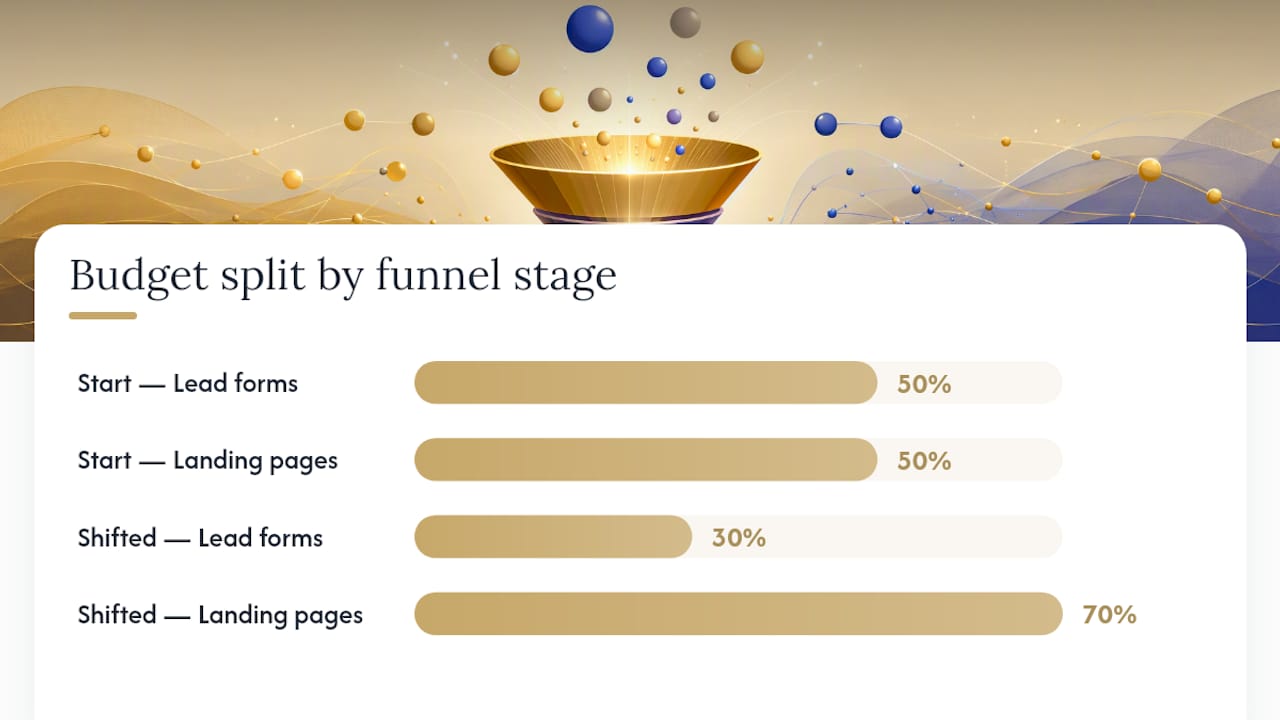
A common starting split is 50/50 for two to four weeks, then shifting to roughly 70/30 in favor of whichever format produced the better cost-per-booked-job, keeping the other as a standing challenger rather than cutting it entirely.
How this plays out depends heavily on the business model. A B2B consultative sale with a six-figure contract value should lean almost entirely on landing pages, even at the top of funnel, because the sales cycle demands trust-building content a form can’t provide. A home services business booking $300 repair calls can run lead forms almost exclusively, provided the follow-up speed is there. A direct-to-consumer brand running a flash promotion often does best with lead forms across the board, since the offer is simple and the urgency is short-lived.
What We’ve Learned Running Both Formats for Clients
An internal rule is simple: match the format to ticket size and follow-up speed, not to whichever ad format feels easier to launch. For B2B offers with high average contract values, we default to landing pages because the buyer needs the extra proof points before a form submission means anything. For simpler, fast-turnaround offers, lead forms with Higher Intent enabled and a five-minute follow-up window in place.
One pattern we’ve seen repeatedly: a client’s lead-form cost per lead looked expensive to explain to a finance team, until we tied it to cost per booked job. Once follow-up dropped under five minutes, the “expensive” lead form arm matched the landing page arm on cost per booked job, despite a higher raw CPL.
Before choosing a format for a new campaign, we check:
Average deal size and sales cycle length
Whether the sales team can commit to five-minute follow-up
Mobile share of the target audience
Whether long-term SEO or AI-search value matters for this specific offer
Pro Tip: If you can’t guarantee fast follow-up on lead forms, don’t run them yet. Fix the follow-up process first, then test the format. The format was never the problem.
Editorial Take: Stop Optimizing for the Wrong Number
The debate over lead forms versus landing pages gets treated like a design preference. It isn’t. It’s a proxy argument for a question most marketers avoid: can your sales process actually handle speed, or does it need the extra qualification a landing page provides?
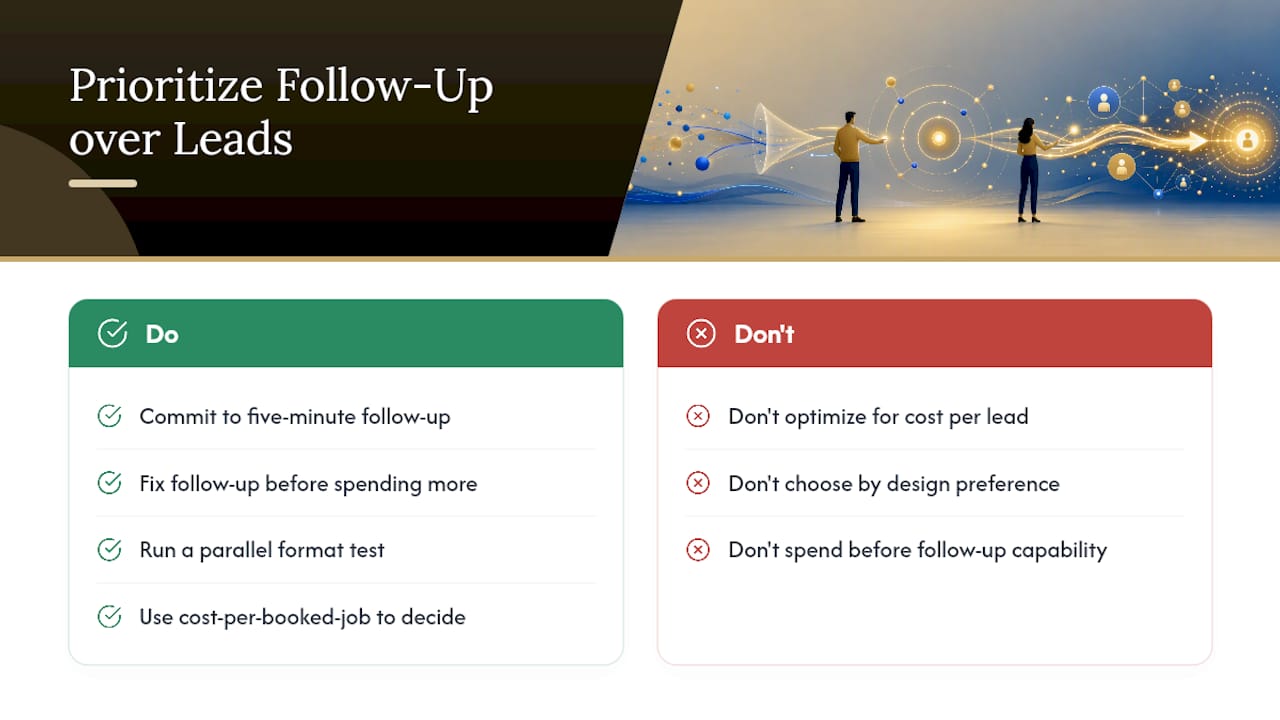
Conventional advice tells you to pick the format with the lower cost per lead. That’s backwards. Cost per lead is the easiest number to game and the least useful one for deciding anything real. A lead form generating leads at half the cost of a landing page is a bad deal if your team can’t call them fast enough to matter.
What I’d prioritize first isn’t the format at all. It’s whether you can commit to five-minute follow-up before you spend another dollar on either option. Fix that, then run the parallel test the data actually supports, then let cost per booked job decide the winner. Everything else is secondary.
— Mieke
Let Flockleads Run the Test and the Follow-Up for You
Running a clean lead form versus landing page test takes discipline most in-house teams don’t have time for: identical creative, a real budget split, a full 21 to 30 day window, and someone tracking cost per booked job instead of getting distracted by cheap cost-per-lead numbers. Some firms build and manage that entire process for B2B companies, so you get the answer without burning a quarter of ad spend figuring it out yourself.

A typical engagement starts with a free audit of your current lead flow, moves into a controlled test across ad platforms and lead formats, and scales whichever combination produces the best cost per qualified lead for your specific sales cycle. Weekly optimization and CRM integration are built into the subscription, so leads land in your pipeline with the follow-up speed the data says you need. If you’re weighing execution options before committing, see how Flockleads runs lead generation for contractors to get a sense of what the engagement actually looks like from audit to scale.
Sources
Frequently asked questions
What Is a Lead Form on Facebook?
A Facebook lead form, also called a Meta lead ad, is a native form that opens inside the Facebook or Instagram app and lets someone submit their contact details without leaving the platform, often with fields pre-filled from their profile.
Are Landing Pages Still Effective for Lead Generation?
Yes. Landing pages remain one of the strongest tools for capturing higher-quality leads, especially for high-ticket or complex offers, and they continue to build long-term SEO and AI-search value that a native lead form cannot.
What’s Another Name for a Landing Page?
Landing pages are sometimes called lead capture pages, squeeze pages, or conversion pages, though “landing page” is the standard industry term used across marketing platforms and analytics tools.
What’s the Difference Between a Landing Page and a Funnel?
A landing page is a single page designed for one conversion action, while a funnel is the full sequence of steps, often multiple pages or touchpoints, that guides a visitor from first click to final purchase or booking.
Should I Use a Lead Form or a Landing Page for B2B Sales?
For most B2B offers with higher contract values and longer sales cycles, a landing page performs better because it can hold the trust signals and detail a complex sale requires; lead forms work best for simpler, lower-commitment B2B offers like webinar or demo signups.
NEED A CLEARER PLAN?
Let’s turn your next move into momentum.
Talk to us →