THE SHORT ANSWER
A well-built lead qualification form collects four fit signals (company size, role, problem, and timeline), one intent signal (preferred next step), applies a weighted score, and routes high-fit leads to sales within minutes.
A well-built lead qualification form collects four fit signals (company size, role, problem, and timeline), one intent signal (preferred next step), applies a weighted score, and routes high-fit leads to sales within minutes.
The five fields every B2B qualification form needs:
Company size (employee count or revenue band) — firmographic fit signal
Job title / role (decision-maker, influencer, or end user) — authority signal
Primary challenge or pain (open text or multi-select) — need signal
Timeline to solve (dropdown: this month, this quarter, 6+ months) — urgency signal
Budget allocated (yes/no or range) — budget signal
Preferred next step (call, demo, content) — intent signal
Score each answer, sum the points, and route leads above your threshold directly to a sales rep. Everyone below goes into a nurture sequence.
Key Takeaways
A high-performing B2B lead qualification form collects five core signals, applies a weighted score, and routes leads above your threshold to sales within 15 minutes.
Point | Details |
|---|---|
Five core fields | Collect company size, role, pain, timeline, budget, and preferred next step on every form. |
Score and route automatically | Leads scoring 50+ points go to sales with a 15-minute SLA; 25–49 enter nurture. |
Match form length to funnel stage | Use 4–6 fields at top-of-funnel; add budget and authority fields on demo pages. |
Test one variable at a time | Run 2–4 week experiments on form length, question order, and microcopy; track SQL rate, not just conversion rate. |
Flockleads | Builds, integrates, and optimizes CRM-connected qualification forms with weekly delivery and scoring reports. |
Why a lead qualification form changes your B2B sales handoff
A structured qualification form does one thing most contact forms never do: it gives sales a reason to call. Without it, reps spend their first conversation asking questions the form should have already answered.
Highspot’s lead qualification guide maps the full picture: fit, intent, authority, timing, pain, and budget all need to be evaluated before a lead gets routed. When those signals live in the form, the handoff becomes a warm transfer instead of a cold start.
Stat to know: Companies with a defined lead qualification process report improved sales cycles and better SQL-to-opportunity conversion rates compared to those relying on rep judgment alone.
The downstream effects compound quickly. Better routing means reps contact the right leads faster, SLA adherence improves, and your CRM data stays clean enough to actually trust. HubSpot Academy’s framework lesson makes the alignment point plainly: when marketing and sales agree on what a qualified lead looks like before the form goes live, inbound leads stop falling through the cracks.
Three things improve immediately when you add a mapped qualification form:
SQL rate rises because unqualified leads get filtered into nurture, not the sales queue
Time-to-contact drops because routing is automatic, not manual
Rep efficiency improves because discovery calls start at step two, not step one
What fields and questions should your qualification form include?
The right form length depends on where the lead is in the funnel and what you’re asking them to do next.
Short form (4–6 fields): top-of-funnel, high-traffic pages
Use this when volume matters and friction is your enemy. Four to six fields, no open text, fast to complete.
Field | Question example | Qualification signal |
|---|---|---|
Company size | “How many employees does your company have?” | Firmographic fit |
Role | “Which best describes your role?” | Authority |
Primary challenge | “What’s your biggest challenge right now?” (multi-select) | Pain / need |
Timeline | “When are you looking to solve this?” | Urgency / timing |
Next step | “What would be most helpful?” | Intent |
Mid form (7–10 fields): demo and scheduling pages
Add budget, industry, and current tool stack. This is where BANT and CHAMP questions earn their place.
BANT asks about Budget, Authority, Need, and Timeline. CHAMP flips the order: Challenges first, then Authority, Money, and Prioritization. GPCT (Goals, Plans, Challenges, Timeline) works well when your buyer is goal-driven. SPICED (Situation, Pain, Impact, Critical Event, Decision) suits complex sales with multiple stakeholders.
MEDDIC (Metrics, Economic Buyer, Decision Criteria, Decision Process, Identify Pain, Champion) is the right framework for enterprise deals. It belongs in a long form or a progressive profiling sequence, not a first-touch form.
HubSpot’s 101 Sales Qualification Questions is a practical resource for populating any of these frameworks with tested phrasing.
Long form (10+ fields or progressive profiling): high-value inquiries
For enterprise inquiries, spread questions across multiple touchpoints. Collect the basics at first touch, then enrich with deeper questions on the thank-you page, in a follow-up email, or during a discovery call.
Conditional logic example: If a prospect selects “500+ employees,” show fields for procurement process and legal review timeline. If they select “1–50 employees,” skip those and show a “when can we talk?” scheduler instead.
Pro Tip: For mid-market and enterprise forms, ask “Is budget allocated for this project?” rather than “What is your budget?” The yes/no version gets answered honestly. A dollar-range question gets abandoned or inflated.
How should you design a form that people actually complete?
Completion rate and answer quality are both design problems. Most B2B forms fail on one or both.
Typeform’s qualification template guidance demonstrates the core principle: one question at a time, with conditional logic that adapts the path based on prior answers, feels consultative rather than interrogative. Completion rates rise because the form never shows a question that doesn’t apply.
Four design rules that hold across every sales motion:
One question per screen for conversational formats (Typeform, Jotform multi-step). For embedded landing page forms, group related fields visually but keep the total under eight.
Use defaults and pre-fills where you have data. If a visitor arrives from a LinkedIn ad, pre-fill company name from the URL parameter. Every pre-filled field is one fewer reason to abandon.
Show progress on forms longer than five fields. A simple “Step 2 of 4” label reduces drop-off on longer sequences.
Microcopy on sensitive fields does real work. Instead of “Budget,” label the field “Do you have budget set aside for this?” and add a subline: “We use this to recommend the right plan, not to qualify you out.”
Pro Tip: Use a conversational one-question-at-a-time format (Typeform-style) for high-value, low-volume campaigns where personalization matters. Use a compact embedded form for high-traffic pages where speed and low friction matter more than depth.
How do you turn form answers into scores and routing rules?
Every field answer should carry a point value. Sum the points, compare to a threshold, and the routing decision makes itself.
Sample scoring model:
Company size 50–500 employees: 10 points. Over 500: 15 points. Under 50: 5 points.
Role is VP, Director, or C-suite: 15 points. Manager: 10 points. Individual contributor: 3 points.
Timeline is “this month” or “this quarter”: 15 points. “6+ months”: 5 points.
Budget allocated (yes): 20 points. Budget not yet allocated: 5 points.
Preferred next step is “book a demo” or “speak to sales”: 10 points.
Score thresholds: 50+ points routes to sales with a 15-minute SLA. 25–49 points enters a mid-touch nurture sequence. Under 25 points goes to a content nurture track.
Salesforce’s lead qualification guide covers how to configure scoring criteria and automation rules inside a CRM so routing happens without manual review. The webhook payload from your form should include: lead ID, score total, score breakdown by dimension, source UTM, and timestamp.
Pro Tip: Weight budget and authority highest. A prospect with no budget and no authority is a research project, not a sales opportunity, regardless of how urgent their pain is.
For teams that want AI to handle the scoring and branching automatically, AI lead outreach automation tools like Astreaux can generate qualification questions, apply dynamic branching, and route leads to the right rep without manual rule-building.
What does the technical implementation checklist look like?
Before your form goes live, run through this list.
CRM and tracking:
Map every form field to a CRM field before launch. Unmapped fields create orphaned data.
Add hidden fields for UTM source, UTM medium, UTM campaign, and session ID. These fields are how you track which lead source produced a customer.
Configure upsert rules so a returning visitor updates their existing record, not creates a duplicate.
Set up an audit log for field-level changes so you can trace routing decisions after the fact.
Validation and fraud protection:
Email format validation (regex) and domain blocklist (free email providers if B2B only)
Phone number format check for required phone fields
CAPTCHA or honeypot field to block bot submissions
Rate-limiting: flag more than three submissions from the same IP within one hour
Data enrichment: Place a company lookup call (Clearbit, Apollo, or similar) after submission, not before. Pre-submission enrichment slows the form. Post-submission enrichment populates CRM fields the prospect didn’t fill.
Pro Tip: Test your full CRM mapping in a sandbox environment with five synthetic submissions before going live. Check that scores calculate correctly, routing fires, and the assigned rep receives the notification. A broken webhook on launch day means lost leads with no recovery path.

How do you A/B test a qualification form?
Start with the metrics that actually matter, then run one experiment at a time.
Primary KPIs:
Form conversion rate (submissions / unique visitors)
SQL rate (SQLs / total submissions)
Time-to-contact (minutes from submission to first rep touch)
Lead-to-opportunity rate
Average contract value of converted leads
Experiment templates:
Short vs. mid form: Run the 4-field version against the 7-field version on the same page. Expect the short form to win on conversion rate; check whether SQL rate compensates.
Question order: Move the budget question from position 3 to position 6. Later placement often improves completion without hurting answer quality.
Conditional logic vs. flat form: Show all questions to one cohort; show only relevant questions (via branching) to the other. Branching typically wins on both completion and answer honesty.
Microcopy test: “What is your budget?” vs. “Is budget allocated for this project?” Test answer completion rate, not just form completion.
Run each experiment for two to four weeks, set a minimum sample size before reading results, and never change two variables in the same test. For turning paid traffic into a steadier lead engine, form optimization is one of the highest-leverage levers available.
Ready-to-use form templates and a launch checklist
Short form template
Company name (text)
Work email (email, validated)
Company size (dropdown: 1–50 / 51–500 / 500+)
Your role (dropdown: Owner / VP / Director / Manager / Other)
Biggest challenge right now (multi-select: 3–5 options)
When do you need a solution? (radio: This month / This quarter / 6+ months)
Mid form template
Fields 1–6 above, plus:
Industry (dropdown)
Current tool or process for this problem (text, optional)
Is budget allocated? (radio: Yes / Not yet / Evaluating options)
Preferred next step (radio: Book a call / See a demo / Get resources)
Long form / progressive profiling
Collect fields 1–10 at first touch. On the thank-you page or in a follow-up email, ask:
Number of people involved in the decision
Current vendor or solution (if any)
Key metric you’re trying to move (open text)
Launch checklist:
All form fields mapped to CRM fields
Hidden UTM fields confirmed in test submission
Scoring rules configured and tested in sandbox
Routing rules set with SLA timers
Confirmation email live and personalized by score tier
Privacy policy link visible on form
Consent checkbox for marketing communications (required for CAN-SPAM and GDPR compliance)
Spam protection active (honeypot or CAPTCHA)
Duplicate/upsert rules confirmed
Rep notification tested end-to-end
For progressive profiling, tag each lead record with a “profile completeness” score and trigger enrichment requests when the score drops below your threshold.
Common mistakes that break lead qualification forms
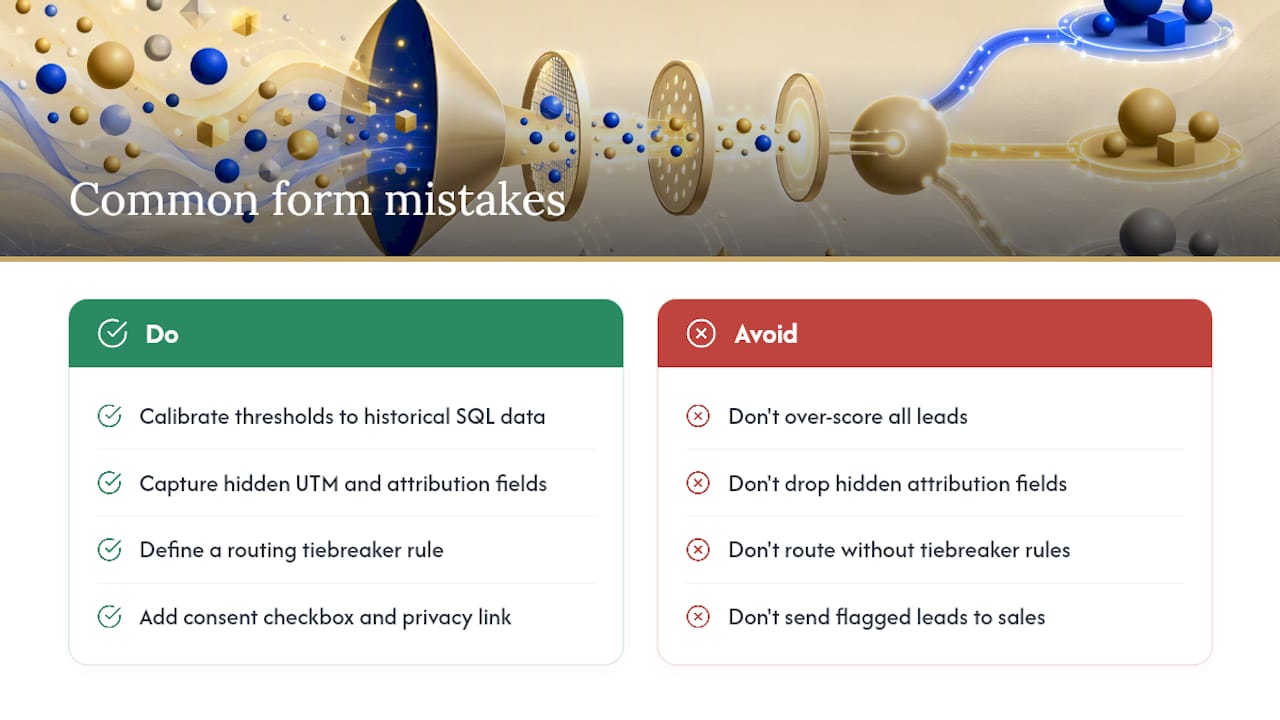
Over-scoring is the most common error. When every lead scores above the threshold, sales gets flooded with unqualified contacts and stops trusting the system. Calibrate thresholds against historical SQL data, not intuition.
Missing hidden fields means you lose attribution data permanently. A lead that converts six months later with no UTM data is a wasted learning opportunity.
Routing loops happen when a lead meets criteria for two territories or two reps. Define a tiebreaker rule (alphabetical, round-robin, or account ownership) before launch.
Privacy guardrails: Include a consent checkbox for marketing communications, link your privacy policy, state your data retention period, and provide an opt-out path in every follow-up email. If you collect and store PII across multiple jurisdictions, consult a privacy attorney before launch.
Red flag signals: Submissions from free email domains (gmail.com, yahoo.com) on a B2B form, identical submissions within seconds, and phone numbers that fail format validation all warrant automatic flagging rather than routing to sales.
Lead marketplaces and purchased lead lists carry a higher rate of these red flags, which makes validation rules even more important when those sources feed your form.
Pro Tip: Build a “junk” lead stage in your CRM for flagged submissions. Review it weekly for false positives before deleting. Some flagged leads are real prospects using personal emails.
What Flockleads has learned building qualification forms at scale
Every qualification form Flockleads builds starts with one question: what does the sales rep need to know before picking up the phone? The answer to that question determines the field set, the scoring weights, and the routing rules. Everything else is implementation.
The pattern that consistently improves results is CRM-integrated scoring with instant routing. When a high-fit lead submits a form at 9 PM and the rep sees the notification at 8 AM with a full score breakdown, the first call is a different conversation than one that starts with “so, tell me about your business.”
One anonymized example: a B2B services client running paid campaigns was routing all form submissions to a single sales inbox. Average time-to-contact was over four hours. After rebuilding the form with a five-field scoring model and automated rep assignment by territory, time-to-contact dropped to under 20 minutes and the SQL rate on inbound leads improved meaningfully within the first 60 days.
The difference between B2B and B2C lead generation matters here: B2B qualification forms carry more weight because the sales cycle is longer and the cost of a bad handoff is higher. Getting the form right is not a nice-to-have.
Flockleads builds and optimizes your qualification forms
Flockleads delivers more than a form template. For B2B companies that need qualified leads arriving directly in their CRM, Flockleads builds the full system: form design, field mapping, scoring logic, routing rules, and weekly optimization based on SQL rate and time-to-contact data.
Every client gets a form matched to their sales motion (short for high-volume campaigns, mid or progressive for enterprise), CRM integration with live routing, and a weekly report showing which fields are predicting SQLs and which are adding friction. The service runs on a monthly subscription with no long-term lock-in, and starts with a free audit of your current lead flow.
If your forms are sending unqualified leads to sales or losing high-fit prospects in a slow inbox, see how Flockleads structures lead generation for service businesses and request your free audit at Flockleads.
Sources
Frequently asked questions
What is a lead qualification form?
A lead qualification form collects firmographic, authority, pain, budget, and timing signals from a prospect and uses those answers to score and route the lead to the right sales action.
How many fields should a B2B qualification form have?
Four to six fields for top-of-funnel pages; seven to ten for demo or scheduling pages. More than ten fields belong in a progressive profiling sequence, not a single form.
Which qualification framework works best for B2B forms?
BANT works well for short forms and SMB sales motions. MEDDIC suits enterprise deals with multiple stakeholders. Most teams run a hybrid: BANT at first touch, MEDDIC questions in follow-up or discovery.
What score threshold should trigger a sales handoff?
Set your threshold based on historical SQL data. A common starting point is routing leads that score 50 or more points to sales with a 15-minute contact SLA, and placing lower-scoring leads into a nurture sequence.
How does Flockleads handle lead qualification forms?
Flockleads builds CRM-integrated qualification forms with scoring logic, automated routing, and weekly optimization reports, delivered as part of a managed B2B lead generation subscription.
NEED A CLEARER PLAN?
Let’s turn your next move into momentum.
Talk to us →