THE SHORT ANSWER
LinkedIn Lead Gen Forms are native ad forms that prefill a member’s profile data, so a prospect can submit their name, email, and job title in a couple of taps without ever leaving LinkedIn. Use them when the goal is volume on a well-defined offer: webinar signups, gated reports, or ABM outreach where you already know the target account.
LinkedIn Lead Gen Forms are native ad forms that prefill a member’s profile data, so a prospect can submit their name, email, and job title in a couple of taps without ever leaving LinkedIn. Use them when the goal is volume on a well-defined offer: webinar signups, gated reports, or ABM outreach where you already know the target account. Skip them, or add heavier qualification behind them, when the offer requires nuance a form can’t capture.
Best for: content downloads, webinar registrations, event RSVPs, ABM sequences
Weaker for: complex demos or sales conversations that need context before a rep gets involved
The catch: frictionless forms pull in curious clickers along with real buyers, so intent dilution is real and downstream qualification isn’t optional
Key Takeaways
LinkedIn Lead Gen Forms convert well because they remove friction, but that same ease demands a routing and qualification system built before launch, not after.
Point | Details |
|---|---|
Match format to offer | Use Sponsored Content for broad content offers and Message Ads for targeted ABM or event invites. |
Keep fields purposeful | Stick to 3 to 4 prefilled fields and give every custom question a routing purpose. |
Verify permissions early | Confirm Lead Sync API roles and account access before relying on automated delivery. |
Track quality, not just CPL | Pair cost per lead with valid business email rate and qualified-lead rate. |
Respond within minutes | Route high-intent submissions to immediate alerts since fast follow-up drives conversion. |
If your team needs the campaigns, forms, and follow-up system built and managed rather than assembled in-house, Flockleads runs automated B2B lead generation across LinkedIn and other channels, including CRM integration and weekly optimization. For a deeper look at how B2B lead capture differs from consumer campaigns, especially around field selection and routing, see how B2B lead generation differs from consumer lead generation.
How Do You Set Up LinkedIn Lead Gen Forms in Campaign Manager?
Building a form takes ten minutes once you know where LinkedIn buries the settings. It happens at the ad level, not the campaign level, so you’ll configure it each time you launch a new creative.
Choose the Lead Generation objective when building the campaign.
At the ad level, select “Create new form” or reuse an existing template.
Write a headline (roughly 60 characters) and a description (roughly 160 characters) that state the offer plainly.
Add a privacy policy URL. LinkedIn requires this on every form, and it needs to be a dedicated, accessible page that discloses how the data gets used, per LeadsBridge’s guide to Lead Gen Forms.
Select prefill fields. LinkedIn recommends 3 to 4 fields for the best completion rates.
Add custom questions or hidden fields (campaign source, UTM values) if your CRM needs them.
Only certain account and page roles can create or edit forms, and API access for pulling responses automatically is a separate, permissioned layer, covered below.
Which LinkedIn Ad Formats Support Lead Gen Forms?
Not every format fits every offer. Matching the format to the ask is where most wasted spend actually starts.
Sponsored Content works best for high-reach, low-commitment offers like a report or checklist, where you want the form to appear in-feed to a broad but targeted audience.
Message Ads and Conversation Ads fit targeted ABM plays and event invites, since the form arrives inside a message the recipient already opened, which tends to raise intent even if it lowers total reach.
Video and carousel creative helps when the offer needs a few seconds of context, a product demo teaser, or a multi-step story, but adds little for a straightforward PDF download.
Document ads work well for original research or benchmark reports where previewing a page or two builds enough trust to justify the form.
The practical rule: match the format’s intimacy level to the size of the ask. A cold Sponsored Content unit asking for a demo request underperforms. A Conversation Ad offering a lightweight checklist probably overspends on personalization it doesn’t need.
What Makes a Lead Gen Form Convert Without Killing Lead Quality?
Form design is where advertisers either build a lead machine or a junk pipeline. The mechanics are simple, but small choices compound fast.
Write a headline that states the offer’s specific value, not a generic teaser, and keep the description under the roughly 160 character limit.
Give every field a job. If a field’s answer won’t change how you route or qualify the lead, cut it.
Use multiple-choice custom questions (company size, budget range, timeline) instead of open text. They’re easier to automate into routing rules and don’t tank completion rates the way free text does.
Set the Thank You page to deliver the asset immediately or push toward scheduling a call, rather than a generic confirmation message. Zapier’s roundup of Lead Gen Form examples shows tailored thank-you experiences converting immediate interest into completed downloads or booked meetings.
Test offer and audience before touching field count. Field-level tweaks are the last lever to pull, not the first.
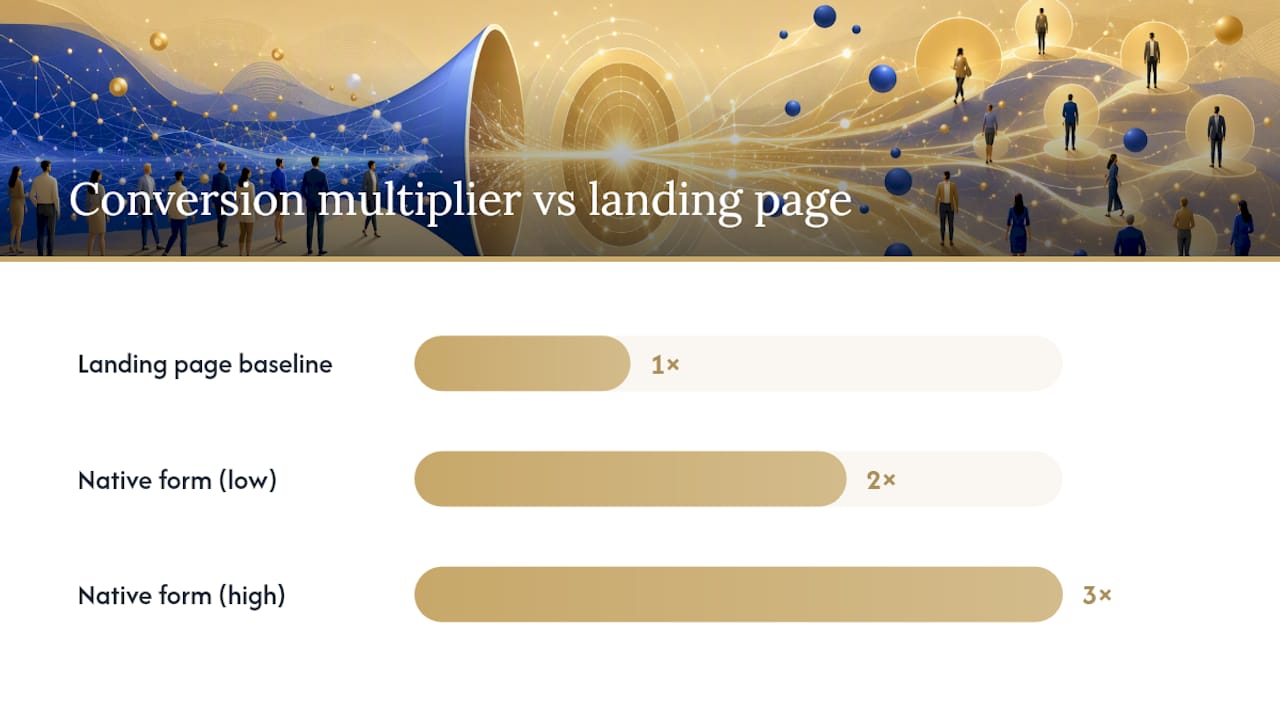
Native forms tend to convert two to three times higher than external landing pages for straightforward offers, largely because they remove the load-time and re-entry friction of a separate page. That lift comes with a tradeoff: easier submission means more low-intent fills, so the qualification layer downstream has to work harder.
Pro Tip: Run your first A/B test on the offer itself, not the form. A stronger headline on a weak offer still underperforms a plain headline on an offer people actually want.
If you’re deciding between a native form and a dedicated landing page for a given campaign, comparing conversion tactics on both before you commit budget saves a wasted testing cycle.
How Should You Route Lead Gen Form Data Into Your CRM?
You have three practical options, and each has a different failure mode.
Manual CSV export works for low volume or a quick test campaign, but it’s slow and someone has to remember to do it, which means leads sit for days.
Third-party integration platforms connect LinkedIn to most major CRMs with minimal setup and handle field mapping visually, a solid middle ground for teams without engineering resources.
Direct Lead Sync API access gives real-time delivery and webhook notifications, but it requires program enrollment and specific ad-account or page-level permissions before you can pull
leadFormResponses. Verify these roles before launch, not after your first campaign goes live and nothing shows up in the CRM.
Before any campaign goes live, run through this checklist: map every form field to its CRM equivalent, set duplicate-detection rules, pass hidden fields like campaign ID for attribution, confirm consent language matches your privacy policy, and send a real test submission through the full pipeline, including the webhook, to confirm it lands where it should. If you’re building this out for the first time, a baseline CRM setup guide for bought leads covers the field mapping fundamentals.
Which Metrics Actually Tell You a Lead Gen Form Is Working?
CPL alone lies to you. A form that’s cheap per lead and expensive per closed deal isn’t a win, it’s a slower way to lose money.
Form opens and completion rate show whether your creative and offer are compelling enough to get someone to start and finish.
Cost per lead (CPL) matters, but only next to quality metrics, never alone.
Valid business email rate flags whether prefilled data is actually usable or full of personal Gmail addresses.
Target-account match rate tells you if the audience targeting is actually reaching the accounts you want.
Qualified-lead rate and pipeline contribution are the metrics that connect the form back to revenue.
Point | Details |
|---|---|
Form opens vs. completions | Track both separately to isolate a creative problem from a form-friction problem. |
CPL vs. qualified-lead rate | A low CPL with a low qualified-lead rate signals an intent problem, not a cost win. |
Native form vs. landing page | Test both under matched audience and bid conditions before declaring a winner. |
Run comparisons with a fixed audience and bid so you’re testing the format, not a hidden variable. Directive Consulting’s guidance on B2B Lead Gen Forms makes the point directly: lead quality gets decided by audience, creative, and offer before the form ever opens, not by the field count alone.
How Do You Turn Form Submissions Into Actual Meetings?
Volume without routing just becomes a backlog nobody works. Set rules before the leads start arriving, not after.
Route by offer type. A demo request gets an immediate alert to a rep; a content download goes into a nurture sequence.
Set SLAs by intent level: immediate contact for high-intent submissions, 24 to 48 hours for lower-intent downloads.
Run enrichment and lead-to-account matching so reps see company size and fit before they dial.
Flag red flags automatically, duplicate submissions, personal email domains, poor company match, and log a disposition on every one so the pattern is visible over time.
Speed compounds. Leads contacted within about five minutes convert at meaningfully higher rates than leads that sit for even a few hours.
Pro Tip: Log a disposition on every lead, including the junk ones. Six months of “why didn’t this convert” data is worth more than a clean-looking spreadsheet.
What Does a Solid Pre-Launch Checklist Look Like in Practice?
Confirm account and page permissions before you build the form, not after it’s live.
Set the privacy policy URL and double-check it links to a real, dedicated page.
Map every field to a CRM destination and pass hidden campaign IDs for attribution.
Send a test submission through the full pipeline, webhook included, before spending a dollar.
Content offers (reports, webinars) typically ramp within the first one to two weeks of spend. Demo-focused campaigns take longer to show a clean qualified-lead rate, often three to four weeks, since sales cycle length affects how fast you get a real read. The most common mistake isn’t the form itself, it’s launching before the CRM mapping is tested, which means the first batch of leads either arrives late or arrives nowhere.
Most Lead Gen Form campaigns don’t fail because the form converts poorly. They fail because nobody built the pipe to catch what the form produces, and by the time someone notices, a week of leads has gone cold.
Why Most Lead Gen Form Advice Misses the Point
Most guides treat Lead Gen Forms as a conversion-rate problem, optimize the headline, trim a field, test a button color. That’s not wrong, exactly, but it’s solving the smaller problem. The real gap between a form that fills a spreadsheet and one that fills a pipeline sits in the operational layer nobody writes about: permissions set up before launch, a CRM mapping tested with a real submission, and an SLA that gets a rep on the phone before the lead’s interest cools.

The conventional wisdom says lower friction always wins. It’s true for volume and false for quality if you stop there. A form that converts at 40% and feeds a CRM with no routing rules is worse than a landing page that converts at 15% and feeds a sales team that calls within five minutes.
If there’s one thing to prioritize first, it’s not the form at all. It’s the pipe behind it. Get the Lead Sync permissions, CRM mapping, and follow-up SLA locked before you spend a single dollar on the ad. Everything downstream, headline copy, field count, offer creative, matters far less than whether a human actually calls the lead while it’s still warm.
— Mieke
Sources
Frequently asked questions
What Are Lead Gen Forms on LinkedIn?
They’re native ad forms that prefill a member’s LinkedIn profile data, letting prospects submit contact information without leaving the platform or loading an external landing page.
How Much Does a LinkedIn Lead Gen Form Cost?
There’s no separate fee for using the form itself; advertisers pay standard LinkedIn ad costs based on their bidding and campaign objective.
How Do You Create a Lead Generation Form in LinkedIn?
Select the Lead Generation objective in Campaign Manager, then build the form at the ad level with a headline, description, privacy policy URL, and 3 to 4 prefilled fields.
What Is the 3-2-1 Rule on LinkedIn?
It’s a content posting framework some marketers use for organic LinkedIn strategy, generally recommending a mix of content types across a set number of posts, and it isn’t specific to Lead Gen Forms or paid ad setup.
Do Lead Gen Forms Work Better Than Landing Pages?
For simple offers like reports or webinar signups, native forms often convert higher than landing pages because they remove extra steps. For complex offers needing more context, a dedicated landing page can qualify leads better before they submit.
NEED A CLEARER PLAN?
Let’s turn your next move into momentum.
Talk to us →