THE SHORT ANSWER
Facebook Lead Ads are the most direct way to collect contact information from potential customers without ever sending them to a website. The format, native to Meta’s advertising platform, opens a pre-filled instant form the moment someone taps your ad. Name, email, and phone number pull automatically from their Facebook profile. They confirm and submit in seconds.
Facebook Lead Ads are the most direct way to collect contact information from potential customers without ever sending them to a website. The format, native to Meta’s advertising platform, opens a pre-filled instant form the moment someone taps your ad. Name, email, and phone number pull automatically from their Facebook profile. They confirm and submit in seconds. For businesses trying to build a steady pipeline, that frictionless experience is the core of the role of Facebook ads in lead generation: reaching people before they search, capturing their details while interest is high, and feeding those contacts into a follow-up system fast.
Here is what makes the format work in practice:
Instant Forms open inside Facebook or Instagram with pre-filled user data, eliminating the load time and navigation friction of a landing page
Messenger chat ads open a conversational thread to qualify leads through automated or live questions
Call ads connect prospects directly to your team by phone
CRM integrations with tools like Salesforce, HubSpot, and Mailchimp sync lead data in near real time, so no contact sits unread in a spreadsheet
A study of over 3,000 campaigns found Facebook lead ads converted at a 12.5% rate, outperforming landing page campaigns by more than 2x. That gap exists because the form never asks anyone to leave the app.
How Facebook lead ads work: mechanisms and options
The user experience is deliberately short. Someone scrolling their feed sees your ad, taps it, and a form appears with their contact details already filled in. They review, hit submit, and the interaction is done. No new tab, no slow-loading page, no abandoned form because the mobile experience was frustrating.

Behind that simplicity, Meta’s algorithm is doing real work. It optimizes delivery toward people in your target audience who have historically submitted lead forms, not just people who click ads. That distinction matters because the Leads objective finds people most likely to complete a form submission, while the Traffic objective only finds people likely to click. Using the wrong objective is the single most common setup mistake.
Conversion location options give you flexibility:
Instant Forms only: highest volume, no website needed, works well for mobile audiences
Instant Forms and Messenger: adds a conversational path alongside the form
Website: sends people to a landing page, requires the Meta Pixel with a lead event configured
Website and Instant Forms: Meta decides per person which path to serve based on predicted conversion likelihood
Calls, Instagram, WhatsApp, App: for businesses that capture leads by phone or in-app
Performance goal choices:
Maximize number of leads optimizes for form submission volume
Maximize number of conversion leads optimizes for lead quality by learning which submitted leads actually became customers, using data fed back from your CRM via the Conversions API (CAPI)
Form customization goes deeper than most advertisers use. You can add custom qualifying questions on top of the pre-filled contact fields, include a review step that asks the user to confirm their details before submitting, and set up a branded completion screen with a link back to your site. Each of those elements affects both volume and quality in ways worth testing deliberately.
What are the real advantages and limitations of Facebook lead ads?
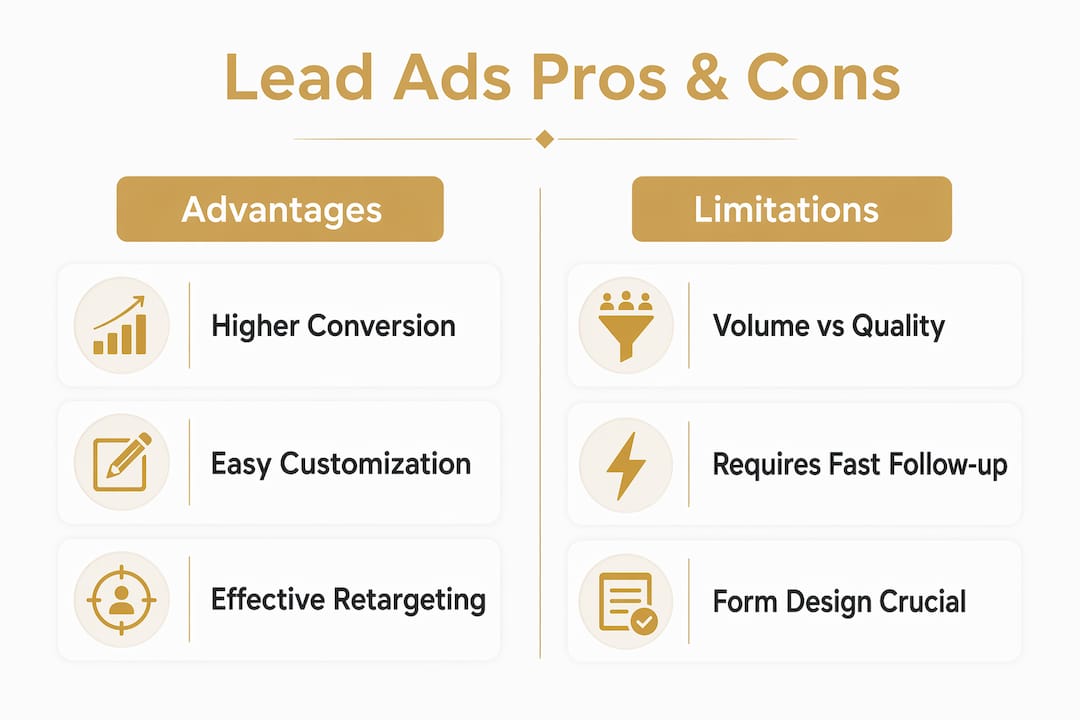
The case for Facebook Lead Ads is straightforward. Low friction drives higher conversion rates, mobile users submit forms without fighting a slow website, and the targeting options let you reach specific job titles, industries, and lookalike audiences built from your existing customers. You can launch a campaign, test creative variations, and have lead data flowing into your CRM within hours of going live.
Key advantages at a glance:
Pre-filled forms reduce drop-off, especially on mobile
No website or landing page required to start collecting leads
Precise targeting by job title, interest, behavior, and lookalike audiences improves lead relevance
Fast creative testing lets you iterate on offers and copy without rebuilding landing pages
Native CRM integrations keep lead data moving without manual exports
The limitations are just as real. Because the form is so easy to submit, low-intent signups are common. Someone taps your ad by accident, their details are already filled in, and they hit submit before they realize what they signed up for. Pre-filled data can also be stale: a phone number from a profile that hasn’t been updated in two years is not useful to your sales team.
Limitations worth knowing before you scale:
Higher volume does not automatically mean higher quality
Pre-filled profile data can be outdated, especially phone numbers
Leads generated this way are typically earlier in the buying journey and need more nurturing
Without fast follow-up, even genuinely interested leads go cold quickly
Less website engagement means less retargeting data and weaker pixel signals
The trade-off between volume and quality comes down to form design. More Volume forms maximize submissions but attract low-intent leads; Higher Intent forms add a review step that trims junk by asking users to confirm their details before submitting.
Pro Tip: Match your form type to your sales process. If your team can handle high volume and has a fast automated follow-up sequence, More Volume forms work well. If each lead requires a sales call and your team’s time is limited, Higher Intent forms with one or two qualifying questions will save hours of wasted outreach.
Best practices for running effective Facebook lead generation campaigns
Effective Facebook lead generation starts with the campaign objective. Always select “Leads,” not “Traffic.” The algorithm behaves differently depending on what you tell it to optimize for, and optimizing for clicks when you want form submissions wastes budget on people who will never convert.
Audience targeting is where most campaigns either win or lose:
Upload your existing customer list as a Custom Audience, then build a Lookalike Audience from it
Layer interest and job title targeting for cold audiences who don’t know your brand yet
Run separate campaigns for distinct audience segments rather than one broad campaign for everyone
Exclude recent converters so you’re not spending money reaching people who already submitted
Your offer has to give someone a reason to hand over their contact details. Cold audiences rarely submit forms for nothing. A free consultation, a specific resource, a pricing estimate, or a demo request all work because they deliver something in exchange. Generic “learn more” CTAs do not.
Form setup tips that actually move the needle:
Add one or two qualifying questions (budget range, timeline, company size) to filter out tire-kickers
Keep the form short: every extra question reduces completion rate
Include your privacy policy URL, which Meta requires and which builds trust with cautious users
Customize the thank-you screen with a clear next step, whether that’s booking a call or visiting your site
Speed of follow-up is the variable most businesses underestimate. Contacting a lead within 5 minutes results in up to 9x higher conversion rates compared to contact after 30 minutes. That window closes fast. Manual processes cannot reliably hit it.
Pro Tip: Connect your lead form to your CRM via a native integration or Zapier the day you launch, not after you’ve collected your first hundred leads. Automated follow-up triggered within minutes of submission is the difference between a lead that converts and one that forgets they ever clicked your ad.

For B2B marketers building multi-stage funnels, understanding how paid traffic becomes a steady lead engine requires thinking beyond the form submission itself. The ad is the first step, not the whole system.
Lead management: what happens after someone submits your form
Meta stores lead data for 90 days. After that, it’s gone from the platform. That alone is a strong argument for automated syncing rather than periodic CSV downloads, but the more pressing reason is speed. A lead that sits in Ads Manager overnight while your team sleeps is a lead that has already moved on.
Options for getting leads out of Meta:
Manual CSV export from Ads Manager, your Facebook Page, or the Leads Center in Meta Business Suite. Workable for very low volume, but a liability at any real scale.
Meta Leads Center lets a small team triage leads directly, marking them as Raw, In Progress, Interested, or Won without needing a separate tool.
Native CRM integrations with Salesforce, HubSpot, Mailchimp, and others sync lead data in real time so your sales team sees new contacts the moment they submit.
Webhook automation via tools like Zapier connects Meta to virtually any CRM or notification system, including Slack alerts for high-value leads.
Once leads are in your CRM, qualification matters. Custom questions from your form give your sales team context before the first call. Segment leads by their answers: someone who indicated a budget under $1,000 gets a different follow-up sequence than someone who said they’re ready to buy this quarter.
Retargeting is where Facebook lead generation pays a second dividend. You can build audiences from people who opened your form but didn’t submit, people who engaged with your Facebook or Instagram page, and people who visited your site from the ad. Running a retargeting campaign to those groups costs less than cold prospecting and converts at a higher rate because the audience already knows your brand.
Current trends and expert insights on Facebook lead ads in 2026
Facebook Ads in 2026 function as a measurable acquisition system that requires clear cost-per-acquisition economics and continuous creative testing to stay profitable. The days of setting a campaign and leaving it are over. What’s working now is a tighter feedback loop between ad performance, lead quality data from the CRM, and algorithm inputs via CAPI.
The biggest structural shift this year is the Conversions API requirement. Starting in April 2026, the Conversion Leads campaign goal is no longer available for new campaigns without a CAPI integration. The reason Meta made this mandatory is that the conversion leads objective only works when the algorithm can see which submitted leads actually became customers. Without that signal, it’s optimizing blind. Meta’s own testing showed the conversion leads goal paired with CAPI can lower cost per quality lead by around 19% versus the standard goal.
What the sharpest advertisers are doing differently in 2026:
Feeding CRM outcome data back to Meta via CAPI so the algorithm learns from closed deals, not just form submissions
Choosing between Instant Forms and website conversions based on offer complexity. Simple offers with fast automated follow-up favor Instant Forms; complex B2B offers where the prospect needs more information before committing often convert better from a landing page
Treating Facebook as a demand creation channel that fills the pipeline with early-stage prospects, then nurturing those contacts over weeks or months rather than expecting immediate sales
Integrating B2B lead nurturing strategies that move prospects from initial form submission through to a qualified sales conversation
The speed-of-follow-up finding from earlier in this article connects directly to the nurturing challenge. Facebook leads are not search leads. They weren’t actively looking for you when they submitted the form. That means the first touchpoint after submission is critical for establishing relevance before interest fades.
Key Takeaways
Facebook Lead Ads convert at a notably higher rate across large campaign samples, outperforming landing pages by more than double, but only when the full system from targeting to follow-up is built correctly.
Point | Details |
|---|---|
Use the Leads objective | The Leads objective optimizes for form submissions; the Traffic objective only optimizes for clicks. |
Speed of follow-up decides conversion | Contacting a lead within 5 minutes produces up to 9x higher conversion rates than waiting 30 minutes. |
Form type controls quality vs. volume | Higher Intent forms add a review step that filters low-intent submissions; More Volume forms maximize raw count. |
CAPI is now required for quality optimization | From April 2026, the Conversion Leads goal requires a Conversions API integration for new campaigns. |
Automate lead sync immediately | Meta stores lead data for only 90 days; manual CSV exports create delays that kill conversion potential. |
Frequently asked questions
What is the purpose of lead generation ads on Facebook?
Facebook lead generation ads capture contact information from potential customers directly inside the platform using pre-filled instant forms, removing the need for a website visit. Their core purpose is to fill a business’s pipeline with prospects at lower friction and cost than traditional landing page campaigns.
How do Facebook ads generate leads?
When someone taps a Facebook lead ad, an instant form opens with their name, email, and phone number pre-filled from their Meta profile. They review and submit in seconds, and that data flows into your CRM or email system via native integrations or webhook automation.
Where do leads from Facebook ads go?
By default, lead data is stored in Meta’s Ads Manager and Leads Center for up to 90 days. Most businesses connect a CRM like Salesforce or HubSpot via native integration or a tool like Zapier so leads sync in real time rather than sitting in Meta’s platform.
What is the difference between leads and sales in Facebook ads?
A lead is a contact who submitted their information through your ad form. A sale happens later, after follow-up, qualification, and a purchase decision. Facebook’s algorithm can optimize for either outcome: the Leads objective maximizes form submissions, while the Conversion Leads objective (requiring CAPI) optimizes for the contacts most likely to become paying customers.
Do I need a website to run Facebook lead ads?
No. Facebook’s native Instant Forms capture leads entirely within the platform, so no website or landing page is required. This makes Facebook lead ads one of the most accessible options for businesses that are just starting out or whose website isn’t built for conversion.
NEED A CLEARER PLAN?
Let’s turn your next move into momentum.
Talk to us →