THE SHORT ANSWER
Speed to lead measures the time between a prospect’s action, a form submission, a chat message, a demo request, and your team’s first meaningful contact with them. For high-intent inbound leads, the practical target is a very short response time; every hour that passes after that erodes your odds of ever reaching them.
Speed to lead measures the time between a prospect’s action, a form submission, a chat message, a demo request, and your team’s first meaningful contact with them. For high-intent inbound leads, the practical target is a very short response time; every hour that passes after that erodes your odds of ever reaching them. The rest of this piece breaks down why that window matters, where teams lose time, and how to systematically close the gap.
TL;DR:
Most teams measure response time from CRM timestamps, but the true starting point is the moment the prospect takes action, which can be minutes earlier than CRM records show.
Responding within five minutes for high-intent leads like demo requests significantly increases the chances of contact and qualification, as interest drops sharply after this window.
Bottlenecks such as manual triage, assignment delays, notification gaps, and booking friction are common causes of response lag, and fixing these requires automation and capacity-aware routing.
Implementing real-time, multi-channel alerts with escalation, automated qualification rules, and instant booking options can help maintain sub-five-minute responsiveness consistently.
Accurate measurement, explicit SLA definitions, and escalation plans are essential to identify delays and ensure reliable, fast lead responses, especially outside business hours.
FlockleadsTurn More Interest Into LeadsFlockleads generates leads for B2B companies and sends them to your website, helping connect demand with your growth efforts.Visit Flockleads
What Speed to Lead Actually Measures
Most teams think they know their speed to lead. Most teams are wrong, because they’re measuring the wrong clock.
The correct starting point is the prospect’s own action, not anything that happens inside your CRM. If someone fills out a form, sends a chat message, or clicks “book a demo,” that moment is time zero. A systems-engineering approach to lead response treats this timestamp as sacred, because CRM record creation can lag behind the actual prospect action by minutes or even hours depending on integration health.
That distinction matters because form platforms, marketing automation tools, and CRMs often don’t sync instantly. A lead that “arrived” in Salesforce at 2:47 PM may have actually submitted the form at 2:31 PM. If you’re measuring from the CRM timestamp, you’ve already lost 16 minutes you didn’t know about. Practitioner guidance increasingly points teams toward using the form platform’s own timestamp rather than trusting the CRM’s created date.
Once you’ve fixed the starting point, break the full journey into its component segments:
Form to CRM: time between submission and the record appearing in your system
CRM to assignment: time between record creation and a rep or queue getting ownership
Assignment to first outreach: time between ownership and the rep’s first attempt (call, email, text)
First outreach to meaningful contact: time between that first attempt and an actual two-way conversation
Each segment tends to have a different bottleneck, and lumping them into one number hides where the real problem lives. A team with a fast overall average might still have a broken assignment step that occasionally strands leads for hours, and that kind of failure only shows up when you isolate the segments.
Use the median, not the mean, when you report these numbers. A handful of leads that sat untouched over a weekend will drag your average into meaningless territory, while the median tells you what a typical prospect actually experiences. Median and SLA adherence give a more honest read than a mean that one bad outlier can distort. A rolling 30-day median, checked against a 90-day baseline, gives you enough data to spot trends without reacting to noise from a single slow day.
How Much Does Response Time Actually Affect Conversion?
The decay curve on lead interest is steeper than most sales leaders assume, and it happens inside the first several minutes, not over days.
Research on inbound sales leads found that contacting a prospect within the first few minutes dramatically increases your odds of actually reaching them and qualifying them, compared to waiting even a short while longer. The Harvard Business Review study on the lifespan of online sales leads remains one of the most cited pieces of evidence for this pattern, and its core finding still holds: interest doesn’t decline gradually, it falls off a cliff.
The data point that should change your process: the odds of making contact with a lead, and of qualifying that lead once you do, drop sharply as minutes pass. Waiting even a modest amount of time after the first few minutes measurably lowers your chances compared to responding immediately.
That decay curve is exactly why “we’ll call them back today” isn’t a strategy, it’s a leak. Here’s how to think about benchmark windows by intent level:
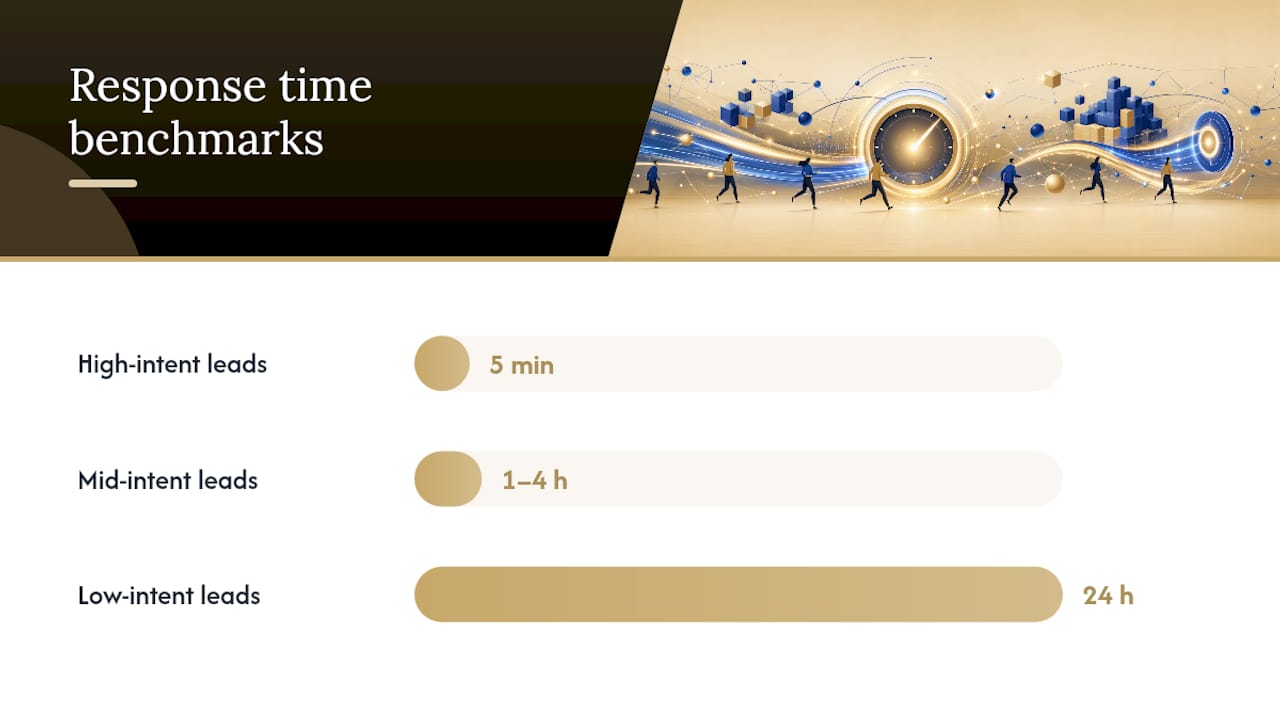
High-intent leads (demo requests, pricing page conversions, direct sales inquiries): respond within 5 minutes. These prospects are actively comparing options right now, often across multiple tabs, and the first vendor to answer frequently wins the meeting regardless of product fit.
Mid-intent leads (content downloads, webinar signups, newsletter conversions tied to a buying signal): respond within 1 to 4 hours. There’s real urgency here, but not the same do-or-lose-it window as a demo request.
Low-intent leads (early-stage content engagement, generic contact form fills with no clear buying signal): respond within 24 hours, with automated nurture filling the gap.
These bands shift by channel and buyer type. A paid search click on a “get a quote” ad behaves like high-intent regardless of form length, while an organic blog comment-to-lead conversion behaves more like mid-intent even if the form asks similar questions. B2B buyers researching a considered purchase, one involving multiple stakeholders and a longer evaluation cycle, tend to tolerate a slightly longer window than a consumer clicking an emergency service ad, but “tolerate” doesn’t mean “reward.” The fastest credible response still wins more often than not.
Where the Minutes Disappear
If your speed to lead is worse than you’d like, the cause is almost never “reps don’t care.” It’s almost always a specific, fixable bottleneck sitting somewhere in your pipeline.
Manual triage and enrichment delays. Someone has to look at the lead, decide if it’s real, check the company size, and route it, and if that someone is a human checking a dashboard every 20 minutes, you’ve already built in a 20-minute floor before anything else happens.
Assignment to unavailable reps. Round-robin routing that doesn’t check calendars sends leads to reps who are in a meeting, on PTO, or already buried in a backlog, and the lead sits until that rep resurfaces.
Notification gaps and alert fatigue. A rep who gets 40 Slack pings a day stops reacting to the 41st. If your “instant” notification looks identical to every other low-priority ping, it isn’t instant, it’s ignorable.
Booking and scheduling friction. Even when a rep responds fast, if the next step requires three email round trips to find a meeting time, you’ve reintroduced multi-day latency right where you thought the problem was solved.
CRM sync delays that corrupt your own measurement. Some teams don’t have a speed problem, they have a measurement problem, and integration lag makes a genuinely fast process look slow (or hides a genuinely slow process behind clean-looking dashboard numbers).
Diagnosing which of these five is your actual bottleneck requires the component breakdown from the measurement section above. Guessing wastes time you don’t have.
How Do You Build a Sub-5-Minute Response System?
Hitting a five-minute target consistently isn’t about telling reps to try harder. It’s an engineering problem, and it gets solved the way engineering problems get solved: with rules, automation, and fallbacks that don’t depend on any single person remembering to act fast.
1. Design instant, availability-aware routing.
Round-robin assignment alone doesn’t cut it once your team has any real headcount or PTO schedule. Effective routing checks calendar availability before assigning, caps how many active leads a rep can hold at once, and falls back to a secondary rep or shared queue the moment the first choice is unreachable. Sustaining fast human response at scale depends on this kind of capacity-based routing and genuine availability awareness, not just on faster software.
2. Build real-time enrichment with waterfall fallbacks.
Enrichment (company size, industry, technographic data) helps reps prioritize and personalize, but it can’t be allowed to block routing. The right pattern is a waterfall: try your primary enrichment source first, fall back to a secondary source if the first one times out, and after a short window, proceed with partial data rather than wait for perfect data. A 10 to 30 second cap on enrichment keeps your routing clock honest.
3. Set qualification rules that run in milliseconds, not minutes.
Basic qualification, company size threshold, industry fit, job title relevance, should be rule-based and automatic wherever possible. Save human judgment for genuinely ambiguous cases, not for every single lead that comes in.
4. Build multi-channel, unmissable alerts with escalation timing.
A single Slack ping isn’t an alert system. A real one fires across multiple channels simultaneously and escalates on a fixed clock when nobody acts. One practical escalation model looks like this:
Time elapsed | Action triggered |
|---|---|
— | Instant multi-channel notification to primary rep (app, SMS, email) |
5 minutes | Escalation to backup rep or manager if no response |
10 minutes | Automatic reassignment to next available rep in queue |
15 minutes | Automated first-touch email sent from the original rep’s address |
This kind of escalation ladder means no single unavailable rep can quietly kill a lead’s window. Vendor tools built for scheduling and alerting, the category Chili Piper sits in, illustrate what this kind of routing and notification stack typically looks like in practice.
5. Implement automated first-touch that buys you time without feeling robotic.
While a human rep is being tracked down, an automated message can go out immediately, ideally from the assigned rep’s own email address, referencing the specific thing the prospect just did, and offering a direct next step like a calendar link. A decoupled first-touch that still looks personal preserves the prospect’s intent while the human follow-up gets queued behind the scenes. The key is that it advances the conversation rather than just confirming receipt.
Pro Tip: Write your automated first-touch templates so they ask a question the prospect can answer in one line. “Are you exploring this for a specific timeline, or just gathering information?” gets replies. A generic “thanks for reaching out, someone will be in touch” gets ignored.
6. Kill the booking gap.
If your fast response ends with “let’s find a time that works,” you’ve handed the delay right back to email ping pong. Live calendar booking embedded in the first-touch message, whether automated or human sent, lets the prospect grab a slot in the same moment they’re engaged, and it captures the meeting immediately rather than after three more exchanges.
7. Test and iterate like you would any production system.
Run load tests before a big campaign launch to confirm your routing logic doesn’t buckle under a spike. Build a rollback plan for when a new routing rule misfires (a bad regex or a broken calendar integration can silently misroute leads for hours before anyone notices). Document your failure modes: what happens when your enrichment vendor goes down, when your primary notification channel fails, when three reps call in sick the same day. A system that only works when everything goes right isn’t a system, it’s a hope.
What Should You Track and How Should You Read It?
Instrumentation is what separates teams that improve speed to lead from teams that just talk about it. You need the four component metrics from the measurement section reported separately, not blended into one number, because a single blended average hides exactly where your bottleneck lives.
Beyond the raw timings, track these as ongoing KPIs:
Median speed to lead (not mean), broken out by lead source and intent tier
SLA adherence rate: the percentage of leads that got a first touch within your target window
Reassignment rate: how often leads get bounced from one rep to another before contact, a strong proxy for availability problems
Time-in-queue distribution: not just the median, but the shape of the distribution, since a long tail of stranded leads matters even if your median looks fine
Lead-to-meeting conversion by response window: this is the metric that proves the whole exercise is worth it, showing conversion rate for leads contacted in under 5 minutes versus 30 minutes versus same-day
A practical dashboard setup looks like this:
Widget | Cadence | Purpose |
|---|---|---|
SLA breach alert | Real time | Flags any lead past its response deadline immediately |
Median speed to lead by source | Daily | Shows which channels are getting fast versus slow treatment |
Reassignment rate trend | Weekly | Surfaces availability or capacity problems before they compound |
Conversion by response window | Weekly | Connects speed directly to revenue outcome, not just process health |
Daily SLA breach alerts should go to whoever owns the routing system, not just to sales leadership in a monthly report. By the time a monthly report flags a problem, you’ve already lost weeks of leads to it. Weekly trend reviews are where you catch slower drifts, a new rep who hasn’t learned the process, a calendar integration that’s started silently failing, before they become a quarter-ending problem. Getting your lead source tracking accurate at this stage also matters, since misattributed sources will scramble every one of these breakdowns.
What Should the First Message Actually Say?
Speed without substance just means you’re fast at annoying people. Each channel needs its own approach to a first touch that feels immediate but still moves the conversation forward.
Phone. Lead with a reference to the specific action they took (“I saw you just requested pricing on our enterprise plan”), confirm you have the right context in one sentence, then move directly toward booking a proper conversation rather than trying to close everything on this call. The goal of call one is connection and a next step, not a full pitch.
SMS. Keep it to one clear call to action. Something like: “Hi [name], this is [rep] from [company], saw you just requested a demo. Got 15 minutes this week? [calendar link].” Skip the pleasantries; texts that ramble read as spam.
Email. Automated first-touch emails work best sent from a real rep’s address rather than a no-reply alias, with a personalization token referencing the specific action taken, and a direct calendar link rather than an open-ended “let me know what works.” Publisher guidance on initial outreach templates by lead intent breaks down how the message should shift depending on whether the lead came from a high-intent or lower-intent source.
Chat. If a prospect is live on your site right now, a human or well-built bot handoff needs to happen in under 60 seconds, or the prospect closes the tab and moves on to whichever competitor answers faster.
Pro Tip: Rotate which rep’s name appears on automated SMS and email first-touches based on who’s actually available that hour. A message signed by a rep who’s in back-to-back meetings all afternoon creates an awkward gap when the prospect replies and gets silence for three hours.
Can You Keep Speed to Lead Fast After Hours?
Business hours end. Buyer intent doesn’t. The teams that hold their response times steady overnight and on weekends do it with automation, not with someone’s phone buzzing at 2 AM.
Send automated acknowledgments that read as human, not canned. A message that references the specific form filled out, states a realistic timeline for human follow-up, and offers an immediate self-serve option (a calendar link, a resource, a chatbot) keeps the prospect engaged instead of wondering if the request vanished into a void.
Let high-intent after-hours leads book themselves. A prospect requesting a demo at 11 PM shouldn’t have to wait until 9 AM just to get a calendar slot. Self-serve booking captures the meeting the moment intent is highest.
Set clear on-call rotations with capacity caps for anything that truly needs a human overnight. Not every business needs 24/7 staffing, but if you sell into a market where after-hours inquiries are common and high-value, a lightweight on-call rotation for your highest-intent tier alone can be worth the cost.
Build throttles and priority lanes for volume spikes. A product launch, a viral post, or a conference booth can flood your pipeline in an hour. Priority lanes that route your highest-intent leads to available capacity first, while lower-intent leads queue for automated nurture, keep your best opportunities from getting buried under volume.
None of this requires round-the-clock staffing. It requires deciding in advance what “good enough” looks like when a human isn’t available, and building the automation to deliver it reliably.
Flock’s Practitioner Checklist for Speed to Lead
Most of what gets written about speed to lead treats it as a motivational problem: hustle harder, check your phone more, care more about the lead. That framing is backwards, and it’s why so many teams read the benchmark, agree it matters, and then don’t actually get faster.
When we work with B2B companies on lead delivery, the instrumentation comes before anything else. You cannot improve what you cannot see accurately, and most teams have never actually measured their form-to-first-contact time using the prospect’s own timestamp. Getting the measurement right first exposes problems that a gut-feel assessment always misses, usually a specific broken handoff step nobody had flagged.

From there, our onboarding checklist for any client focused on response speed covers four things in order: confirm timestamping is accurate at the source, define routing rules that account for actual rep availability rather than a simple round robin, write down explicit SLA definitions with numbers attached (not “respond quickly,” but “respond within 5 minutes for tier-one leads”), and build the escalation playbook before you need it, not after a lead sits untouched for six hours and someone asks what went wrong.
The uncomfortable truth is that most “speed to lead problems” are actually “we never wrote down our rules” problems. Teams intuitively know fast response matters. Few have translated that belief into a system that enforces it automatically, on a bad day, with a rep out sick, at 9 PM on a Friday. That’s the gap worth closing first.
— Mieke
How Flock Helps You Act on Speed to Lead
Knowing your target response window doesn’t help much if your pipeline still routes leads through a manual triage step or a rep who’s already at capacity. Qualified B2B leads can be delivered directly into your CRM with instant delivery built into the handoff, so the clock you’re trying to protect starts working in your favor from the first second rather than fighting a broken intake process.
That matters more with bought leads than with organic ones, since a lead you’re paying for loses value fast if your internal routing can’t keep pace with how quickly it arrived. Campaigns across Meta, LinkedIn, Google, TikTok, and SEO can feed qualifying forms straight into your existing systems, with weekly optimization and reporting so you can see exactly how fast, and how well, those leads get worked. If you’re deciding whether managed lead delivery or running your own campaigns fits your team better, this comparison of B2B lead generation walks through how intent and prioritization differ by lead type. To see whether a managed lead flow or an in-house campaign build makes more sense for your current setup, check the lead generation agency versus lead marketplace breakdown and get a sense of where your team’s speed-to-lead system needs to be before the leads start arriving.
Sources
Frequently asked questions
What Does Speed to Lead Mean?
Speed to lead is the time between a prospect’s action, filling out a form, starting a chat, requesting a demo, and your team’s first meaningful contact with them. It’s measured from the prospect’s own timestamp, not the CRM’s record creation time.
How Important Is Speed to Lead?
It’s one of the strongest predictors of whether a lead ever gets qualified or converted, since contact and qualification odds fall sharply as minutes pass after the initial inquiry. High-intent leads contacted within 5 minutes convert at meaningfully higher rates than those reached even an hour later.
What Response Time Should B2B Teams Target?
For high-intent inbound leads like demo requests or pricing inquiries, aim for under 5 minutes. Mid-intent leads (content downloads, webinar signups) can tolerate 1 to 4 hours, while low-intent leads are reasonably handled within 24 hours alongside automated nurture.
Is Fast Lead Response Worth the Investment in Automation?
Yes. Automated routing, enrichment waterfalls, and SLA escalation consistently cut processing time from hours to seconds and lift SLA adherence, which directly improves conversion without adding headcount.
How Does Flock Help With Speed to Lead?
Flock delivers qualified B2B leads with instant CRM integration, removing the intake delay that often causes slow response before a rep even sees the lead. That pairs directly with the routing and SLA fixes covered in this speed-to-lead systems guide.
NEED A CLEARER PLAN?
Let’s turn your next move into momentum.
Talk to us →