THE SHORT ANSWER
Google Ads is Google’s paid advertising platform that places your ads in front of people when they search, watch videos, browse websites, or use apps. You pay only when someone takes an action, such as clicking your ad, and you set the budget yourself with no minimum spend required. Here is what it can do for a small business:
Google Ads is Google’s paid advertising platform that places your ads in front of people when they search, watch videos, browse websites, or use apps. You pay only when someone takes an action, such as clicking your ad, and you set the budget yourself with no minimum spend required. Here is what it can do for a small business:
Drive website traffic and sales by appearing at the top of Google Search results for relevant queries
Generate leads by capturing contact information from people actively looking for your product or service
Build brand awareness through image and video ads on YouTube and across millions of partner sites
Promote an app with ads that appear inside other apps and on Google Play
Reach local customers with location-targeted ads tied to map searches and nearby intent
Pricing depends on the campaign type you choose. Search ads typically use cost-per-click (CPC), video ads use cost-per-view (CPV), and display ads can use cost-per-thousand impressions (CPM). You control daily budgets, and Google will not charge you more than your monthly budget cap.
Key Takeaways
Google Ads works best when your campaign structure, ad relevance, and landing page all align with the specific query or audience you are targeting.
Point | Details |
|---|---|
Ad Rank beats raw budget | Quality Score and ad relevance can outrank higher bids and lower your cost per click. |
Match campaign type to goal | Search for direct response, Display for awareness, Performance Max only after you have conversion data. |
Track conversions before launch | Without conversion tracking live from day one, you cannot tell which keywords or ads are working. |
Budget averaging is normal | Google may spend up to 2x your daily budget on busy days but caps your monthly total. |
B2B needs a ramp period | Expect four to eight weeks before a B2B Search campaign delivers consistent, qualified leads. |
What is Google Ads explained, and how does the auction work?
Every time someone searches on Google or visits a site in Google’s network, an auction runs in milliseconds to decide which ads appear and in what order. This is not a simple highest-bidder-wins system. Google uses a score called Ad Rank to make that decision, and your bid is only one part of it.
Ad Rank is determined by five main factors:
Your bid — the maximum amount you are willing to pay per click or per thousand impressions
Ad quality and Quality Score — Google’s estimate of how relevant and useful your ad and landing page are to the person searching
Auction context — the user’s device, location, time of day, and search query
Expected impact of ad assets — whether your sitelinks, callouts, and other extensions are likely to improve performance
Auction competitiveness — how many other advertisers are bidding on the same opportunity
The practical implication: A competitor with a higher bid does not automatically beat you. If your ad is more relevant to the searcher’s query and your landing page delivers a better experience, Google can rank your ad above theirs and charge you less per click. Quality beats budget more often than beginners expect.
The flow works like this: a user types a query or visits a page → Google runs the auction → ads are ranked by Ad Rank → the winning ads are shown → you are charged only when the user takes the action your campaign is set to measure (a click, a view, an impression). The actual amount you pay is typically just enough to beat the Ad Rank of the advertiser below you, not your full maximum bid.
What campaign types does Google Ads offer, and which fits your goal?
Google Ads includes seven main campaign types, each built for a different surface and a different marketing objective. Picking the wrong one is the most common beginner mistake.
Search campaigns
Text ads that appear on Google Search results pages when someone types a relevant query. This is the most direct-response format available because you are reaching people who are actively looking for what you sell. A plumber running Search ads for “emergency pipe repair Chicago” is talking to someone who needs help right now.
Display Network campaigns
Image and banner ads that appear across millions of websites, apps, and Gmail inboxes that are part of the Google Display Network. Display is better for building awareness than capturing immediate demand. It reaches people who may not be searching yet but fit your audience profile.
Shopping campaigns
Product listing ads that show a photo, price, and store name directly in Google Search results. These are built for e-commerce retailers and pull product data from a Google Merchant Center feed rather than keywords alone.
Video (YouTube) campaigns
Video ads that run before, during, or alongside YouTube content. Skippable in-stream ads, non-skippable bumper ads, and in-feed video ads each serve different awareness and consideration goals. For YouTube lead generation, the format works best when paired with a strong offer and a clear call to action.
App campaigns
Ads that promote mobile app installs or in-app actions across Search, YouTube, Display, and Google Play. You provide creative assets and Google’s system assembles and tests combinations automatically.
Performance Max campaigns
A single campaign type that runs across all Google surfaces simultaneously: Search, Display, YouTube, Gmail, Maps, and Discover. You provide creative assets, audience signals, and a conversion goal, and Google’s automation handles placement and bidding. It is powerful but gives you less granular control, so it works best once you have conversion data for the system to learn from.
Demand Gen campaigns
A newer format focused on mid-funnel awareness and consideration, running across YouTube, Gmail, and Discover. It is designed to reach people who are not yet searching but are likely to be interested based on behavioral signals.
Campaign type | Best-fit goal | Typical ad format |
|---|---|---|
Search | Direct response, lead gen, sales | Text ads |
Display | Brand awareness, remarketing | Image/banner ads |
Shopping | E-commerce product sales | Product listing cards |
Video (YouTube) | Awareness, consideration | Video ads |
App | App installs, in-app actions | Auto-assembled multi-format |
Performance Max | Multi-surface conversions | All formats combined |
Demand Gen | Mid-funnel awareness | Video, image, carousel |
Two quick examples for small businesses:
A local accounting firm wanting new clients should start with a Search campaign targeting queries like “small business accountant near me.”
A boutique clothing brand launching a new line should pair a Display or Demand Gen campaign for awareness with a Shopping campaign to capture purchase intent.
How do bidding and pricing models actually work?
Understanding how Google charges you prevents billing surprises and helps you pick the right strategy from day one.
The four main pricing models:
CPC (cost-per-click): You pay when someone clicks your ad. Standard for Search and Display campaigns focused on traffic or leads.
CPM (cost-per-thousand impressions): You pay per 1,000 times your ad is shown, regardless of clicks. Common for Display and awareness campaigns.
CPV (cost-per-view): You pay when someone watches a set portion of your video ad (typically 30 seconds or the full ad if shorter). Used in YouTube campaigns.
CPA (cost-per-acquisition) / Target ROAS: You set a target cost per conversion or a target return on ad spend, and Google’s automated bidding adjusts bids in real time to hit that goal.
Bidding can be manual or automated. Manual CPC gives you direct control over individual keyword bids. Automated strategies like Target CPA, Target ROAS, and Maximize Conversions hand optimization to Google’s machine learning, which adjusts bids at auction time based on signals you cannot see, such as the user’s browsing history and device context. The trade-off is real: you gain optimization efficiency but lose granular control. Automated strategies need conversion data to work well, so running them on a brand-new account with zero conversion history often produces poor results.
How daily budgets actually work: If you set a $20/day budget, Google may spend up to $40 on a high-traffic day and less on a slow one. Over the course of a month, your total charges will not exceed your daily budget multiplied by the number of days in that month. That monthly cap is the ceiling Google guarantees.
Pro Tip: Start with manual CPC or Maximize Clicks while your account collects initial conversion data. Then switch to a conversion-focused automated strategy once the system has enough data to optimize intelligently.
How to set up your first Google Ads campaign
Google’s recommended setup flow follows a logical sequence that keeps beginners from skipping the steps that matter most.
Create your Google Ads account. Go to ads.google.com, sign in with a Google account, and complete the account setup. Skip the “Smart campaign” prompt if you want full control; choose “Switch to Expert Mode” to access all campaign types.
Choose your campaign objective and type. Pick the goal that matches your business outcome (leads, sales, website traffic, brand awareness) and then select the campaign type that fits that goal. A lead-gen goal for a service business almost always starts with Search.
Build your ad groups, keywords, and audiences. Group related keywords into tightly themed ad groups. For Search campaigns, use a mix of phrase match and exact match keywords to control who sees your ads. For Display or Video, define your audience by demographics, interests, or remarketing lists.
Write your ads and add assets. For Search campaigns, use Responsive Search Ads (RSAs), which let you write up to 15 headlines and 4 descriptions. Google tests combinations and serves the best-performing ones. Add sitelinks, callouts, and structured snippets as ad assets to improve Ad Rank and click-through rate.
Set up conversion tracking and billing. This is the step most beginners skip and later regret. Install the Google Ads tag on your website or connect Google Analytics 4 before you spend a dollar. Without conversion tracking, you cannot tell which keywords or ads are generating real business. Set your daily budget and add a payment method to activate the campaign.
Before you launch, check these three things:
Your landing page matches the promise in your ad headline
Your conversion tracking is firing correctly (use Google Tag Assistant to verify)
Your payment method is confirmed and your billing threshold is set
First 14 days: what to monitor
Watch clicks, impressions, CTR, and cost per conversion daily for the first two weeks. If a keyword is spending budget with zero conversions after a reasonable number of clicks, pause it. Keep changes small and give each one enough data before drawing conclusions.
Which metrics should you track, and what do they tell you?
Beginners often fixate on impressions because the number looks impressive. Impressions tell you reach, not results. Here is what each metric actually measures and when to act on it.

Metric | What it measures | Action if underperforming |
|---|---|---|
Impressions | How often your ad was shown | Low impressions: raise bid, broaden keywords, or check budget |
Clicks | How many people clicked your ad | Low clicks with high impressions: rewrite headlines, improve CTR |
CTR (click-through rate) | Clicks divided by impressions | Below benchmark: test new ad copy or tighten keyword targeting |
CPC (cost-per-click) | Average cost per click | High CPC: improve Quality Score or refine keyword match types |
Conversions | Completed goals (form fills, purchases, calls) | Low conversions: audit landing page relevance and load speed |
CPA (cost-per-acquisition) | Cost to generate one conversion | High CPA: pause poor keywords, improve ad relevance |
ROAS (return on ad spend) | Revenue generated per dollar spent | Low ROAS: adjust bids, cut low-performing products or keywords |
Quality Score | Google’s 1–10 rating of ad relevance and landing page | Low: rewrite ads, improve landing page match to keyword |
Quality Score deserves special attention. It is built from three components: expected CTR, ad relevance, and landing page experience. Improving ad relevance and landing page quality can lower your CPC without touching your bid at all, because a higher Quality Score raises your Ad Rank and reduces what you need to pay to maintain position. Achieving a good Quality Score on your core keywords is a reasonable target for a well-structured campaign.
Which metrics matter by campaign type? For Search, focus on CTR, CPA, and Quality Score. For Display, watch CPM, view-through conversions, and frequency. For Video, track view rate, CPV, and brand lift if you have access to it. For Shopping, ROAS and product-level conversion rate are the primary dials.
Is $10 a day enough for Google Ads, and why did I get charged more than expected?
Is $10/day enough? It depends entirely on your industry and keywords. In low-competition local markets, $10/day can generate meaningful clicks and a handful of leads per week. In competitive industries like legal services, insurance, or software, $10/day may buy only two or three clicks. The honest answer: $10/day is enough to learn and test, but probably not enough to scale results in most B2B or professional service categories. Start there to gather data, then increase budget once you know which keywords convert.
Why did Google charge more than my daily budget? Google averages your daily budget across the month. On high-traffic days it may spend up to twice your daily budget, and on slow days it spends less. Your monthly total will not exceed your daily budget multiplied by the number of days in the billing month. If a charge looks unexpectedly large, check whether you have multiple active campaigns sharing a budget, whether a billing threshold was crossed, or whether a shared budget was set higher than you intended.
Troubleshooting unexpected charges:
Check all active campaigns, not just the one you think is running
Review shared budgets in the campaign settings
Look at your billing threshold in the Payments section
Check whether automated bidding overspent on a high-conversion day within the monthly cap
Cost-control basics for beginners:
Set an account-level budget alert in Google Ads notifications
Use negative keywords to block irrelevant searches from eating budget
Start with narrow geographic targeting before expanding
Pause any ad group that has spent more than 5–10x your target CPA with no conversions
Benchmarks for CPM, CPV, and CPC vary significantly by industry, keyword intent, and competition level. Treat any published average as a rough reference point, not a guarantee. Your actual costs will depend on your Quality Score, your competitors’ bids, and how tightly you have defined your audience.
Beginner best practices that reduce wasted spend fast
The single biggest lever in a new Google Ads account is structure. Campaigns organized by goal, ad groups organized by tightly themed keywords, and ads written to match those themes generally perform better than loosely structured accounts at the same budget.
High-impact setup habits:
Write at least three headline variations per Responsive Search Ad so Google has meaningful combinations to test
Pin your most important headline to position 1 if brand consistency matters, but leave other positions unpinned
Match your ad’s headline language to the landing page headline so the user’s experience feels continuous
Add at least four ad assets (sitelinks, callouts, structured snippets) to every campaign from day one
Optimization cadence: Review performance weekly for the first month. Check search term reports every week to find irrelevant queries and add them as negative keywords. After 30 days, compare ad variations and pause the weakest performer. Run one change at a time so you know what caused any shift in results.
Dos and don’ts for new accounts:
Do keep your initial keyword list short and tightly themed (10–20 keywords per ad group)
Do not use broad match keywords until you have strong negative keyword lists built up
Do set up conversion tracking before the campaign goes live
Do not run Performance Max as your first campaign; start with Search where you can see exactly what triggered each ad
Pro Tip: *Check your “Search terms” report after the first week of a Search campaign.
Improving your landing page conversion rate is often more valuable than any bid adjustment.
What B2B companies should know before running Google Ads
Google Ads can work well for B2B lead generation, but the timeline and cost dynamics are different from e-commerce or local consumer services. Setting realistic expectations upfront saves a lot of frustration.
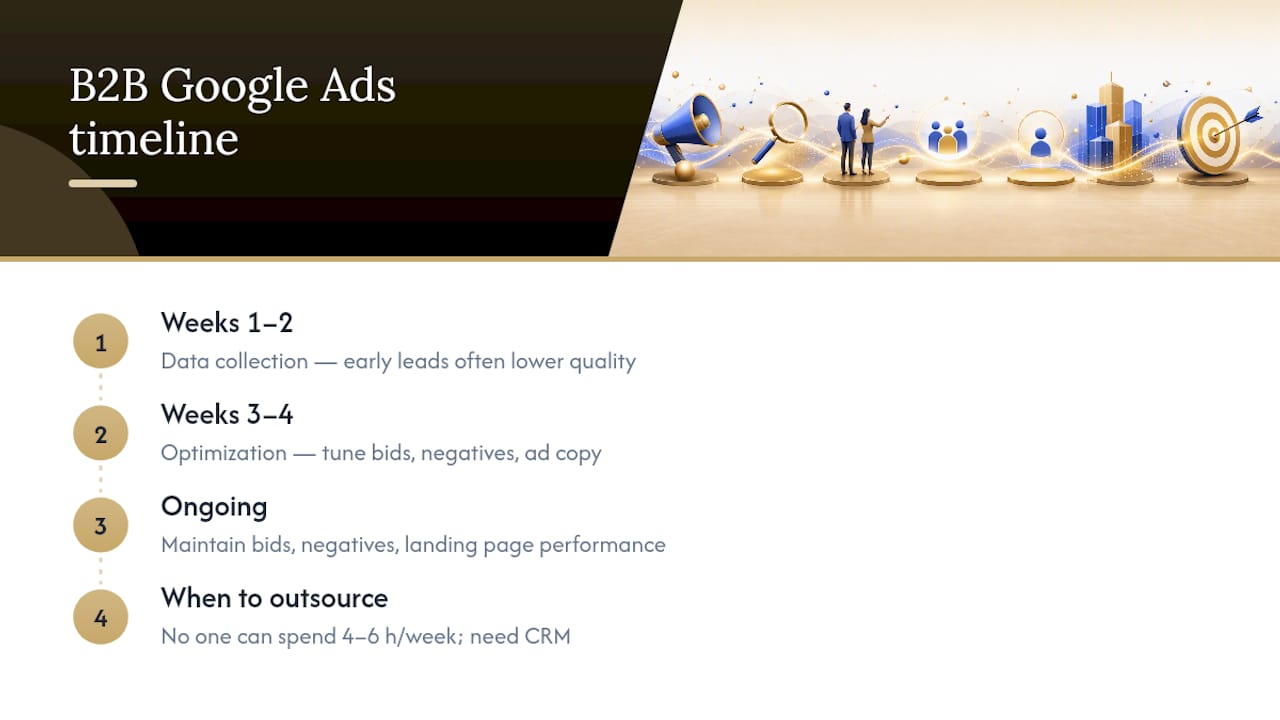
Ramp time is real. Most B2B Search campaigns require several weeks before they produce a steady, predictable flow of qualified leads. The first two weeks are data collection. The second two weeks are optimization. Leads that come in during week one are often lower quality because the campaign has not yet learned which queries and audiences convert. Budget for that learning period.
Lead quality depends on more than the ad. The ad gets the click. What happens after determines whether that click becomes a real lead. Landing pages need a specific, relevant offer. Lead forms should ask enough questions to qualify the prospect without asking so many that people abandon. CRM integration matters too: if leads are not routed to the right person within minutes, conversion rates drop sharply.
For B2B companies with longer sales cycles: Google Ads generates the top-of-funnel inquiry. Your follow-up process, qualification criteria, and CRM workflow determine whether that inquiry becomes revenue. Treating Google Ads as a complete lead-generation system without those downstream pieces in place is where most B2B campaigns underperform.
When does outsourcing make sense? If your team does not have someone who can dedicate four to six hours per week to campaign management, or if you need CRM integration and lead qualification built in from the start, a managed platform is worth considering. Google Search ads for lead generation require ongoing attention to keyword bids, negative keywords, ad copy, and landing page performance. The learning curve is manageable, but it takes time.
For B2B companies weighing whether to run ads themselves or use a managed approach, comparing Google Ads with buying leads is a useful starting point for understanding the trade-offs on cost, control, and lead quality.
When Google Ads is the right call for a small business
Google Ads is worth it when you have a specific offer, a defined audience, and the patience to let a campaign learn before you judge it. For small businesses with a clear service and a local or niche market, Search campaigns can generate qualified leads within weeks at a manageable cost. The platform rewards relevance over budget, which means a well-run small account can compete with larger advertisers on the same keywords.
That said, running Google Ads well takes consistent attention and benefits from thoughtful small business marketing strategies that drive real growth. If you are stretched thin or need leads flowing while you focus on delivery, a managed approach removes the weekly optimization burden. Flockleads runs automated, qualified lead generation campaigns across Google, Meta, LinkedIn, and other channels for B2B companies who want leads delivered without managing the platform themselves.
If you are ready to explore managed lead generation, see how Flockleads works for contractors and B2B businesses or start with a free audit to see what your current setup is leaving on the table.
Sources
The sources below are worth bookmarking whether you are setting up your first campaign or trying to understand why a live campaign is underperforming.
Frequently asked questions
What are Google Ads in simple terms?
Google Ads is a paid advertising platform that shows your ads to people when they search on Google, watch YouTube, or browse websites in Google’s network. You set a budget and pay based on clicks, views, or impressions depending on the campaign type.
Is $10 a day enough for Google Ads?
In low-competition local markets, $10/day can generate useful data and a few leads per week. In competitive industries, it may buy only two or three clicks per day, making it better for testing than scaling.
Why did Google Ads charge me more than my daily budget?
Google averages your daily budget across the month and may spend up to twice your daily budget on high-traffic days. Your total monthly charge will not exceed your daily budget multiplied by the number of days in that billing month.
How much does Google Ads pay per 1,000 views?
Google Ads does not pay advertisers per view. CPM (cost-per-thousand impressions) is what you pay to show ads 1,000 times. Rates vary by industry, targeting, and competition and are not publicly fixed.
How long does it take for Google Ads to generate leads?
Search campaigns can produce clicks from day one, but consistent, qualified lead flow typically takes four to eight weeks as the campaign collects data and the bidding strategy optimizes toward your conversion goals.
NEED A CLEARER PLAN?
Let’s turn your next move into momentum.
Talk to us →