THE SHORT ANSWER
High traffic with low leads is almost never a traffic problem. It’s a conversion problem. The average website conversion rate is about 2.9%. Most B2B sites fall between 2% and 3%, with many small business sites converting below that. Sending more visitors to a broken funnel doesn’t fix anything. It just burns more budget.
Why most websites fail to turn traffic into leads
High traffic with low leads is almost never a traffic problem. It’s a conversion problem. The average website conversion rate is about 2.9%. Most B2B sites fall between 2% and 3%, with many small business sites converting below that. Sending more visitors to a broken funnel doesn’t fix anything. It just burns more budget.
The core reasons visitors don’t convert:
Visitor intent mismatch: Informational traffic browses; it doesn’t buy. Someone searching “what is B2B lead generation” and someone searching “B2B lead generation service for SaaS” are not the same person.
Unclear messaging: If a visitor can’t tell what you do, who it’s for, and what to do next within five seconds, most will leave.
Weak or missing CTAs: Without a clear, visible next step, interested visitors read the page and go.
Poor user experience: Slow load times and clunky mobile layouts push visitors out before they ever see your offer.
Friction in lead capture: Long forms, too many fields, and asking for commitment before trust is built all kill conversions.
Slow follow-up: Even a well-converted form fill loses value fast. Responding promptly to leads significantly increases conversion likelihood.
Fix the conversion system first. More traffic is the most expensive mistake you can make when the funnel has leaks.
Common reasons your website traffic isn’t converting
Visitor intent doesn’t match your offer
Not all traffic wants what you’re selling. High-intent traffic converts at a significantly higher rate than cold traffic. If most of your organic visits come from “how to” or “what is” queries, you’re attracting researchers, not buyers. Check which keywords are actually sending people to your pages before assuming the site itself is broken.
Your homepage fails the five-second test
Visitors form a credibility judgment about a website within milliseconds of landing. The three questions every first-time visitor needs answered immediately: What does this business do? Who is it for? What should I do next? A vague tagline, a paragraph about company history, or a rotating hero image with abstract language fails all three. Most visitors are gone before they read a single line of body copy.

CTAs are missing, buried, or competing with each other
A call to action is the specific step you want a visitor to take. Without one that’s visually prominent and placed above the fold, most visitors read the page and leave. The other common mistake is having too many competing CTAs with equal visual weight. When you give someone four things to click with the same emphasis, the most common outcome is that they click none of them.
Page speed and mobile experience are killing conversions
Even small delays in page load can reduce conversions. Faster-loading pages convert better than slower ones. Mobile accounts for a large share of web traffic globally, but mobile users generally convert at a lower rate than desktop users, partly because mobile pages are consistently slower and harder to navigate. A site that takes four or five seconds to load on a 4G connection loses a large share of visitors before they’ve seen the headline.
Forms ask for too much, too soon
Most contact forms request name, email, phone, company, role, company size, and a message before the visitor has any reason to trust you. Form abandonment is commonly high when forms ask for too much information upfront. Shorter forms tend to produce more leads at higher volume. Qualification happens in the follow-up conversation, not in the form itself.
Trust signals are in the wrong place
Placing testimonials next to CTAs can increase lead conversion substantially. Testimonials buried on a separate “Reviews” page do almost nothing. A specific, named client quote placed directly next to your “Book a Call” button does a great deal. Most sites get this backwards.
Wrong traffic sources bring non-buyers
Paid traffic usually arrives with less context than organic. Organic visitors found you because they were already searching for something related. Paid is interruptive. If your ad copy and landing page headline don’t match exactly, you’ve created a mismatch within two seconds of arrival. Tighter message alignment between the ad and the page is the fix, not more ad spend.
Navigation is confusing visitors out of converting
Confusing site structure and unclear user flows suppress conversions just as effectively as slow pages. Visitors who can’t find what they came for leave. Intuitive navigation, logical page hierarchies, and a clear path from entry page to conversion point all reduce the friction that kills leads quietly.
Pro Tip: Open your homepage in an incognito window and read only what’s above the fold. If a stranger can’t tell in five seconds what you sell, who it’s for, and what to do next, that’s your first fix.
How to improve lead conversion from your website traffic in 2026
Fixing conversion is almost always more cost-effective than buying more traffic. Here’s where to start.
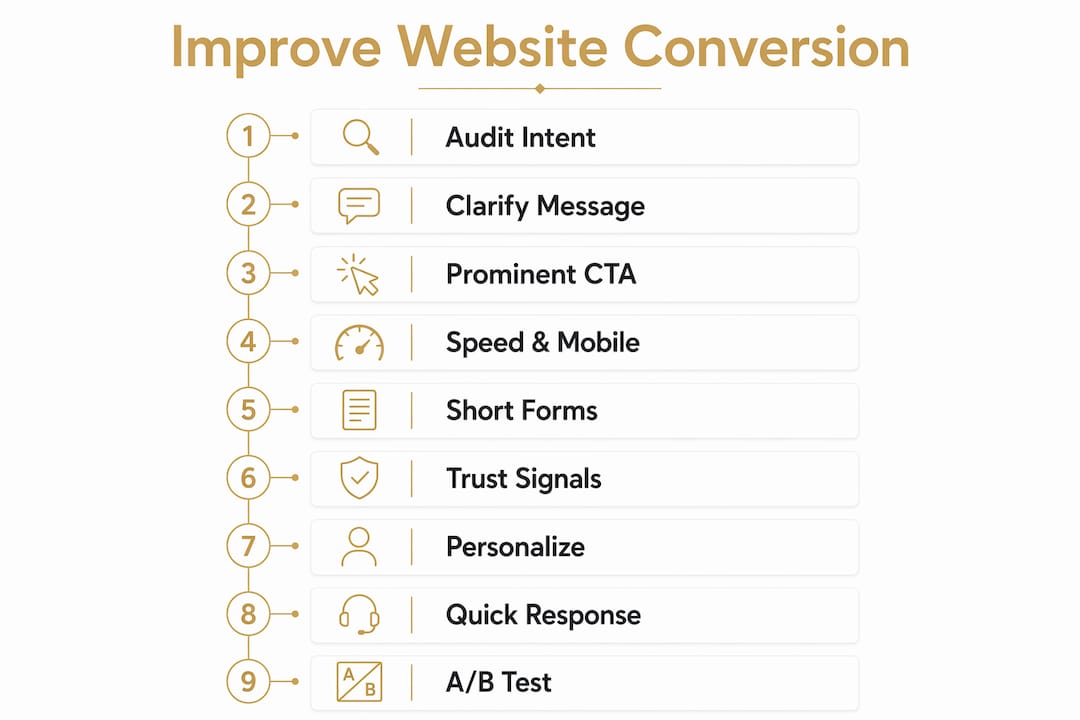
1. Audit your traffic intent before anything else
Pull your top organic keywords in Google Search Console. Separate informational queries from transactional ones. If the majority of your traffic comes from “how to” searches, your SEO is building an audience, not a pipeline. Either shift your keyword targeting toward higher-intent terms or change the on-page offer for those informational pages to something that matches where those visitors actually are in their buying journey.
2. Clarify your homepage messaging
Answer the three questions above the fold: what you do, who it’s for, and what to do next. Cut vague taglines. Replace abstract language with specific outcomes. “We help B2B service companies generate qualified leads through their website” beats “We grow your business” every time.
3. Place one prominent CTA above the fold
Pick a single primary action for each key page and make it impossible to miss. One CTA with clear visual weight outperforms four competing options. Secondary offers (a guide download, a free audit) can live lower on the page, but they should never compete visually with the primary action.

4. Fix page speed and mobile responsiveness
Run your site through Google PageSpeed Insights. Target a load time under 2.5 seconds on mobile. Compress images, reduce render-blocking scripts, and use a content delivery network if you’re serving visitors across multiple regions. Mobile optimization isn’t optional when mobile drives the majority of web traffic.
5. Shorten your forms to the essentials
Cut form fields to the minimum needed to start a conversation. Name and email is often enough to open a dialogue. Gather qualifying information during the follow-up call or in a post-submit booking flow, not upfront. Cutting fields from 12 to 4 typically lifts conversion by 30–50%.
6. Add a lower-commitment conversion path
“Book a Demo” filters out the 90% of visitors who aren’t ready for that conversation yet. Add a second door: a pricing calculator, a fit-check form, a free resource, or a short qualification chat. Content-first offers generally convert at a higher rate than direct demo requests. That’s a meaningful difference from the same traffic.
7. Place trust signals next to your CTAs
Move testimonials off the “Reviews” page and onto your key landing pages, directly adjacent to the CTA. Use specific, named client quotes with real outcomes. Case studies, recognizable client logos, and third-party review ratings all reduce the perceived risk of taking action. Trust signals work where doubt appears, not buried in the footer.
8. Use dynamic, conversational lead capture
Static long forms create friction and reduce conversion. Interactive funnels and conversational flows engage visitors who aren’t ready to fill out a traditional contact form. Tools built around multi-step, question-based flows consistently outperform single-page forms, particularly on mobile. This is one of the highest-impact changes for most B2B sites.
9. Personalize based on visitor behavior
Treat a first-time blog reader differently from a repeat visitor who has spent time on your pricing page. Behavior-based engagement outperforms passive forms and static chat widgets. Segment by page intent and trigger follow-up from observed behavior, not just form submissions. Visitors who return to high-intent pages multiple times are signaling buying interest even if they haven’t raised their hand yet.
10. Respond to new leads within five minutes
The chance of conversion is up to nine times greater when you respond within five minutes of a lead landing. If form fills sit in a CRM until the next morning, you’re losing pipeline that already converted on the website. Automate the initial acknowledgment and routing so no lead waits more than a few minutes for a response, regardless of when it comes in.
11. Use heatmaps and session recordings to find the real bottlenecks
Tools like Hotjar and Microsoft Clarity show you where visitors click, how far they scroll, and where they abandon. A heatmap might reveal that visitors never scroll far enough to see your key benefits or trust badges. Session recordings show the exact moment confusion sets in. These behavioral tools surface the “why” behind the numbers that Google Analytics alone can’t explain.
12. Run A/B tests on your highest-traffic pages
Don’t guess which headline, CTA, or layout works better. Test them. A/B testing turns observations into validated decisions. Start with the pages that already get the most traffic and have the clearest conversion goal. Test one variable at a time: headline copy, CTA button text, form length, or trust signal placement. Doubling your website conversion rate from 2% to 4% results in twice the leads from the same traffic volume.
Pro Tip: Start your conversion audit on your pricing and services pages, not your blog. Those pages already attract high-intent visitors. Fixing friction there produces faster lead gains than publishing more content.
How trust signals and user experience directly drive conversions
Trust and UX aren’t soft concepts. They’re measurable conversion levers.
Testimonials placed near CTAs increase conversion by 15–34%, but only when they’re specific and named. Generic “Great service!” quotes do little. A quote from a real client with a real outcome, positioned directly next to your primary CTA, gives the visitor social permission to act. The placement is as important as the content.
“The better the UX design is, the higher your conversion rate is going to be and the more brand loyalty you will build.” — Françoise Sonnet, Senior Business Advisor, BDC Advisory Services
Visitors quickly judge site credibility. That judgment happens before they read a word. A slow, cluttered, or visually outdated site signals untrustworthiness before your value proposition has a chance to land. Speed and design aren’t aesthetic choices. They’re conversion infrastructure.
Key trust and UX factors that directly affect whether visitors convert:
Named, specific testimonials placed adjacent to CTAs, not on a separate reviews page
Page load speed under 2.5 seconds, especially on mobile connections
Clear contact information and visible business credentials reduce perceived risk
Case studies and client logos near conversion points signal credibility to buyers in research mode
Interactive and conversational funnels reduce abandonment by meeting visitors where they are in the buying journey
Rapid lead response after a form fill preserves the trust built on the page
In B2B, 97% of website visitors remain anonymous during their research journey. Most of them are evaluating you silently before they ever fill out a form. Every trust signal on the page is doing work on those visitors even when you can’t see it in your lead count yet. The goal is to make the decision to reach out feel low-risk and obvious.
Key Takeaways
Website traffic converts into leads only when messaging, trust, and conversion paths are aligned with visitor intent.
Point | Details |
|---|---|
Traffic volume isn’t the problem | The average B2B site converts only a small fraction of visitors; fixing the funnel beats buying more traffic. |
Five-second clarity test | Your homepage must answer what you do, who it’s for, and what to do next above the fold. |
Speed kills conversions | Even small load delays reduce conversions; fast mobile load times are important. |
Trust signals need proximity | Testimonials increase conversion only when placed next to CTAs. |
Speed to lead matters | Responding quickly boosts conversion likelihood significantly. |
Frequently asked questions
Why does your website get traffic but no leads?
Traffic without leads is almost always a conversion system problem, not a traffic volume problem. The most common causes are unclear messaging, weak CTAs, wrong-intent visitors, slow mobile pages, long forms, and insufficient trust signals near conversion points.
Is a 12% conversion rate on a website good?
A 12% conversion rate is well above average. The average B2B site converts around 2–3% of visitors, and top-performing B2B landing pages convert significantly higher. Reaching 12% typically requires strong message match, minimal form friction, and well-placed trust signals.
What is the 80/20 rule of SEO?
In SEO, the principle generally means that a small portion of your pages drive the majority of your organic traffic and leads. Focusing optimization efforts on those high-performing pages, particularly high-intent ones like pricing and services pages, produces faster conversion gains than spreading effort evenly across all content.
How do you get more qualified visitors to convert?
Audit your traffic sources and separate high-intent visitors from informational browsers. Then align your page messaging and CTA to match what high-intent visitors are actually looking for. Adding a lower-commitment conversion path alongside your primary CTA, such as a fit-check form or pricing guide, captures buyers who aren’t ready for a full sales conversation yet. For a deeper look at how paid traffic converts, the same intent-matching principles apply.
If your website is getting traffic but your lead count is flat, the fix is structural. Flockleads works with B2B service companies to engineer lead flow directly from their existing website traffic, without requiring more ad spend or more content. See how it works and find out where your funnel is leaking.
NEED A CLEARER PLAN?
Let’s turn your next move into momentum.
Talk to us →