THE SHORT ANSWER
Yes, YouTube ads can generate qualified B2B leads, but only when you run them as a CRM-wired, sequenced, full-funnel program rather than a single “boosted” video. The approach that works: three campaign tiers (prospecting, engagement, conversion), Custom Intent and Customer Match layered on top of remarketing, and view-through windows tracked back to your CRM.
Yes, YouTube ads can generate qualified B2B leads, but only when you run them as a CRM-wired, sequenced, full-funnel program rather than a single “boosted” video. The approach that works: three campaign tiers (prospecting, engagement, conversion), Custom Intent and Customer Match layered on top of remarketing, and view-through windows tracked back to your CRM. Expect influence on pipeline within 30 to 60 days, not instant form fills in week one.
TL;DR:
Running YouTube ads as a full-funnel, sequenced program with separate prospecting, engagement, and conversion campaigns yields qualified B2B leads over a 30 to 60-day period.
Custom Intent and Customer Match targeting significantly improve relevance and cost-efficiency, especially when layered together with remarketing based on CRM data.
Creative sequences should start with immediate problem statements, follow with solution proof, and conclude with a clear, single CTA, with short, authentic videos outperforming polished productions.
Proper tracking setup, including CRM offline imports and view-through windows aligned to sales cycles, is essential to accurately measure YouTube’s influence on pipeline growth.
A minimum monthly budget of $3,000 to $5,000 is recommended to gather enough data, with smaller budgets suitable for remarketing-focused campaigns targeting existing leads.
What Role Does YouTube Play in a B2B Marketing Funnel?
YouTube does three different jobs depending on where a buyer sits in the funnel, and treating it as a single-purpose channel is the most common reason B2B teams give up on it too early. At the top, it scales awareness among problem-aware buyers who haven’t started researching vendors yet. In the middle, it earns consideration through longer explainer content that walks through how the product actually solves the problem. At the bottom, it retargets people who already watched something, pushing them toward a demo request or a content download.
Search and LinkedIn dominate the moment someone actively types a query or scrolls a feed with intent. YouTube works differently. It builds memory before intent exists, which matters enormously in B2B because the average buying committee spends months evaluating before anyone fills out a form. A B2B buying journey usually involves five or more stakeholders, and video reach lets you touch several of them before your sales team ever gets a name.
This is why view-through behavior counts for more in B2B than raw click-through rate. Someone watches 45 seconds of a product explainer, doesn’t click, and books a demo three weeks later after a Google search for your brand name. That’s YouTube doing its job, even though the click never happened on YouTube itself.
Consider how this plays out for account-based marketing:
Prospecting reaches the full buying committee, not just the decision-maker.
Engagement campaigns identify which stakeholders are actually watching past the first ten seconds.
Retargeting serves proof content specifically to warmed accounts before sales outreach.
Statista’s global ranking of social platforms by user count consistently places YouTube among the largest audiences on earth, which is exactly why the scale argument for early-funnel B2B reach holds up even in narrow industries.
How Should You Structure a B2B YouTube Campaign?
Three tiers, three objectives, three separate budgets. Mixing them into one campaign is the fastest way to confuse Google’s bidding algorithm and waste spend on the wrong audience at the wrong stage.
Prospecting. Objective: maximize reach among cold, problem-aware audiences. Bid on CPV (cost-per-view) since you’re paying for attention, not action. Use broad Custom Intent and in-market audiences here.
Engagement. Objective: identify warm viewers. Optimize toward video quartile completions, specifically 75% and 100% view rates, since those viewers are the ones worth spending more to convert.
Conversion. Objective: drive demo requests or content downloads. Switch to Target CPA bidding, but only once you have at least 30 to 50 conversions in the account’s history. Google’s algorithm needs that volume to optimize properly.
Google’s own YouTube for Business documentation lays out the format options that map to these tiers: in-stream and Video Reach campaigns for prospecting, Video View campaigns for engagement, and Demand Gen for conversion-focused creative that can run across YouTube, Discover, and Gmail simultaneously.
Keep frequency caps tight, especially in the conversion tier. Five impressions per week per user is a reasonable ceiling before fatigue sets in. Exclude anyone who already converted from every tier except a light “nurture” remarketing pool, and never run the same creative across all three tiers. A prospecting hook and a conversion offer are different jobs; they need different scripts.
Cheap conversions on thin data usually mean the algorithm is guessing.*
Which Targeting Options Actually Reach B2B Decision-Makers?
Custom Intent is the most underused lever in B2B video advertising. It lets you build audiences from the actual Google searches your buyers run, things like “marketing attribution software” or “field service CRM comparison,” rather than relying on YouTube’s broader interest categories. Practitioner analysis on B2B YouTube strategy consistently points to Custom Intent as more precise and far cheaper than equivalent LinkedIn targeting built on job titles alone.
Layer that with Customer Match, which lets you upload your CRM list of known contacts and either target them directly or build lookalike audiences from your best accounts. Remarketing then catches anyone who watched a video, visited your site, or engaged with a previous ad, and placement targeting lets you run ads specifically on channels your ICP already watches, whether that’s industry YouTube creators or competitor product review videos.
Practical steps for building this stack:
Start your Customer Match seed list with closed-won accounts from the last 12 months, not your entire database.
Keep seed lists under heavy filtering. A list padded with dead leads dilutes the lookalike audience quality.
Layer Custom Intent on top of Customer Match lookalikes rather than running them separately. This narrows reach but sharply improves relevance.
For ABM, upload account lists at the domain level where your ad platform supports it, then map creative to buying-committee role (a CFO-focused ad differs from an ad aimed at the technical evaluator).
Pro Tip: Audience expansion sounds appealing but tends to pull in adjacent, lower-intent viewers fast. Turn it off for conversion-tier campaigns and only test it cautiously in prospecting.
What Creative and Sequencing Actually Convert B2B Viewers?
The first five seconds decide whether anyone sees the rest of your ad, and most B2B creative wastes that window on a logo animation or a slow establishing shot. Open with the problem your buyer already has, stated in language they’d use themselves, not marketing language.
Length should match funnel stage. A 6-second bumper works for proof points and offers in the retargeting tier, a 15-second cut works for prospecting where attention is scarce, and a 30-second format earns its length only in engagement campaigns where the viewer has already shown some intent to keep watching. Practitioner guides on programmatic B2B video recommend exactly this kind of sequenced structure: a short hook, a mid-length education piece, and a short proof or offer bumper, tied together with view-based remarketing so the same viewer sees the sequence in order rather than a random mix.
The sequence itself matters more than any single ad:
Hook (6-15s): Name the specific problem, ideally with a number or a scenario the viewer recognizes instantly.
Solution walkthrough (30s): Show the product actually solving that problem, not a montage of your team smiling in an office.
Proof (15s): A stat, a client name, or a result. This is where credibility gets established.
Offer (6s): One clear next step, one clear CTA, no second option to confuse the viewer.
Authenticity beats production value at almost every stage of this sequence. LinkedIn’s Creative Labs analysis of thousands of B2B video ads found that short, expert-led “real talk” formats lifted engagement significantly, while cinematic, highly polished brand films also showed notable engagement lifts when the message stayed grounded in a real voice rather than generic corporate narration. The pattern across both formats: an actual person speaking directly to the viewer outperforms polish.
Write role-based scripts. A script aimed at a VP of Operations should sound different from one aimed at a Director of IT, even if it’s promoting the same product. Refresh creative every four to six weeks; B2B audiences are smaller than consumer audiences, so frequency fatigue sets in faster than most teams expect.
How Do You Measure and Attribute YouTube’s Influence on Pipeline?
The tracking stack has to exist before the campaign launches, not after someone asks why pipeline hasn’t moved. Four pieces are non-negotiable:
Google Tag Manager on every conversion page, firing events for demo requests, content downloads, and pricing page visits.
Google Ads conversion actions tied to those events, imported so the platform can optimize toward them.
CRM offline conversion imports, feeding closed-won and opportunity-stage data back into Google Ads so the algorithm learns which leads actually turned into revenue, not just form fills.
Account-level matching, using CRM domain data to tie ad exposure back to specific accounts even when the person who watched isn’t the one who eventually converts.
View-through windows should scale with your typical sales cycle. A 7-day window works for transactional, low-consideration offers; a 30-day window is more realistic for enterprise deals with multi-month cycles. Recommendations for setting up this kind of VAST/VMAP tagging and viewability tracking point to the same conclusion: without proper tagging, you’ll systematically undercount YouTube’s contribution to pipeline.
Attribution signal | What it captures | Recommended window |
|---|---|---|
Click-through conversion | Direct clicks leading to a form fill | 30 days |
View-through conversion | Ad viewed, conversion happens later without a click | 7 to 30 days depending on sales cycle |
CRM-matched influenced opportunity | Account touched by YouTube ad before opportunity created | Full sales cycle |
Run a holdout test before trusting any of these numbers fully. That gap is the closest thing to true incrementality you’ll get without a full media mix model. Setup guides for lead-generation objectives in Google Ads walk through the account prerequisites, including Analytics and CRM connections, needed before this kind of testing is even possible.
What Should You Budget, and What CPA Should You Expect?
Set expectations before you set a budget. YouTube’s cost-per-view for B2B campaigns typically runs far below LinkedIn’s cost-per-click, which is why it works as a volume play even for niche industries. Independent analysis of B2B video spend puts YouTube CPVs in the $0.03 to $0.15 range against LinkedIn CPCs often above $8 for comparable B2B categories.
That gap doesn’t mean YouTube leads are automatically cheaper. It means you’re buying far more reach and impressions for the same dollar, which matters most in the prospecting tier where the goal is exposure, not immediate conversion.
Minimum viable monthly budget to gather real learning signal: roughly $3,000 to $5,000, split across tiers.
Small budgets under that threshold should skip prospecting entirely and run remarketing-first against existing site traffic and CRM lists.
As conversion volume grows past 30 to 50 monthly actions, shift 10 to 15% of prospecting budget into the conversion tier every few weeks rather than all at once.
A Google Search comparison is useful context here: Search captures existing intent at a higher CPA, while YouTube builds the intent that Search later captures.
What Are the Most Common Mistakes That Sink B2B YouTube Campaigns?
Most underperforming programs share the same handful of failures, and nearly all of them are fixable before launch rather than after the budget is spent.
No CRM wiring. Conversions get counted as form fills instead of pipeline, so the algorithm optimizes toward the wrong outcome.
Wrong bid strategy too early. Switching to Target CPA before 30 conversions exist starves the algorithm of data and tanks delivery.
No sequencing. Running one generic ad across every tier instead of a hook, proof, and offer sequence.
Missing frequency caps. Same viewer sees the ad 20 times in a week, and fatigue kills recall instead of building it.
No exclusion lists. Converted leads keep seeing prospecting ads, wasting spend on people already in your funnel.
Before launch, confirm tracking fires correctly, landing pages load fast on mobile, exclusion lists are built, and at least two creative variants exist per tier. If a live program is underperforming, check CRM import frequency first. Stale offline conversion data is the single most common silent failure.
How Flockleads Approaches YouTube for B2B Lead Generation
Flockleads builds B2B lead pipelines across YouTube and video alongside Meta, LinkedIn, Google, and TikTok, wiring every channel into the same qualifying forms and CRM delivery system so leads show up ready for sales, not buried in a spreadsheet.
The operational notes that guide this work:
Creative cadence follows the four to six week refresh window, tested against role-based scripts rather than one-size-fits-all messaging.
Bidding shifts from CPV to Target CPA only once conversion volume clears the threshold needed for the algorithm to optimize reliably.
CRM mapping happens before launch, not retrofitted after a client asks why pipeline numbers don’t match ad platform reporting.
Pro Tip: If your team can’t answer “how many closed-won deals touched a YouTube ad in the last 90 days” right now, that’s the gap to close before spending another dollar on video.
How Does YouTube Fit With LinkedIn and Email in a Full B2B Stack?
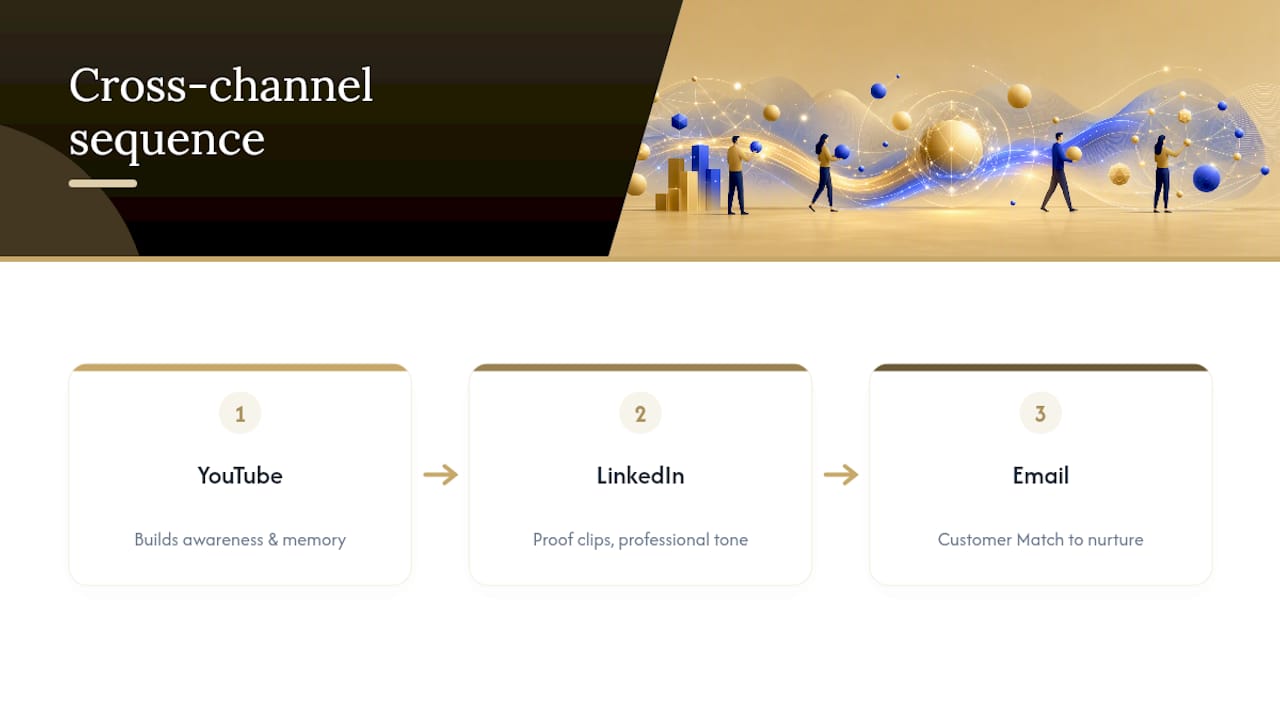
YouTube shouldn’t run in isolation, and treating it as a standalone channel is where a lot of budget gets wasted on redundant reach. The strongest B2B programs use YouTube to build the awareness and memory that LinkedIn and email later convert.
A practical sequence: someone watches a YouTube explainer without clicking, then sees a LinkedIn sponsored post from the same campaign a week later using proof content instead of the original hook. That repetition across platforms, using different creative angles for the same message, builds recall faster than repeating the identical ad on one channel. LinkedIn’s own B2B video engagement research shows expert-led formats perform well specifically because they feel consistent with the more professional tone LinkedIn audiences expect, so reusing a YouTube proof clip there tends to outperform a from-scratch LinkedIn video.
Email closes the loop. Once a Customer Match list shows engagement (watched 75% of a video, clicked through, visited a pricing page), that same contact should move into an email nurture sequence built around the specific proof points from the video they watched. Sync this at the list level: export the Customer Match audience segment weekly and feed it into your email platform’s suppression or trigger logic.
The mistake most teams make is running these three channels with three different messages and three different offers. Buying committees notice the inconsistency, especially in longer B2B cycles where the same stakeholder sees your brand across multiple channels over several weeks. One core narrative, adapted in length and tone per platform, outperforms three disconnected campaigns every time.
What Legal and Compliance Rules Apply to B2B YouTube Advertising?
Compliance in B2B YouTube advertising centers on three areas: data handling for Customer Match, disclosure requirements for testimonials and claims, and platform-specific ad policies that differ from LinkedIn’s B2B-focused rules.
Customer Match requires that uploaded contact lists come from data you collected with appropriate consent, and Google’s policies prohibit using data acquired without a legitimate business relationship or proper opt-in. If your CRM list includes contacts from purchased data or scraped sources rather than direct customer relationships, that list is a compliance risk before it’s ever a performance one.
Any specific claim in your creative, whether it’s a customer result, a statistic, or a comparison to a competitor, needs to be substantiated and, where regulations require, disclosed clearly on-screen rather than buried in a description field. This applies with particular force in regulated B2B categories like financial software, healthcare technology, or legal services, where advertising rules go beyond general Google Ads policy into industry-specific regulation.
Review creative against Google’s ad policy center before launch rather than after a rejection delays your sequencing timeline. None of this replaces legal review for your specific industry and claims; treat these as operational flags, not a substitute for counsel.
How Can LinkedIn Data Improve Your YouTube Targeting?
LinkedIn’s data advantage is job title and company firmographic precision, and B2B teams that only use it for LinkedIn ads are leaving targeting intelligence on the table. Export insights from LinkedIn Campaign Manager, specifically which job titles, seniorities, and industries engage most with your existing LinkedIn ads, and use that as the blueprint for your Customer Match seed lists on YouTube.
The most useful transfer isn’t audience size, it’s message-market fit. If LinkedIn data shows your highest-engagement segment is Directors of Operations at companies with 50 to 200 employees, build YouTube Custom Intent audiences around search terms that segment would actually use, and write creative hooks addressing their specific operational pain points rather than a generic executive pitch.
Firmographic data from LinkedIn (company size, industry, growth stage) also sharpens account-level exclusions on YouTube. If your ICP excludes companies under 20 employees, cross-reference your LinkedIn engagement data to build a negative account list, then upload that as an exclusion for Customer Match campaigns so YouTube spend doesn’t chase accounts that will never close.
One caveat: LinkedIn’s own data stays inside LinkedIn’s ad platform. You can’t directly import LinkedIn audience segments into Google Ads. What transfers is the insight, the job titles, industries, and firmographics that convert, which you then recreate manually as Custom Intent keywords and Customer Match criteria inside Google Ads.
How Should You Nurture Leads From YouTube Ads?
A lead from a YouTube ad rarely arrives ready to buy, since most of them converted after a view-through influence rather than an active, high-intent search. Treat the nurture sequence accordingly: slower, more educational, and tied back to whatever content they actually watched.
Segment nurture tracks by which video sequence stage the lead engaged with. Someone who converted after watching a proof-stage bumper is further along than someone who only saw a top-of-funnel hook video, and the first email or sales outreach should reflect that difference rather than sending identical messaging to both.
Sales handoff timing matters more for YouTube-sourced leads than for Search-sourced ones. A Search lead actively typed a query showing intent; a YouTube lead may have converted on view-through influence days after watching. Flag these leads distinctly in the CRM so sales reps adjust their opening approach, leading with value and context rather than assuming the same urgency a Search-originated lead would show.
Build a short automated email sequence (three to four touches over two weeks) referencing the specific proof points or use cases shown in the ad sequence they engaged with. This reinforces the message rather than starting a generic nurture track from scratch, and it measurably shortens the gap between lead capture and sales-ready status for accounts already exposed to your full creative sequence.
A 90-Day Plan for Teams Starting From Zero
Weeks 1 to 2: wire tracking (GTM, CRM offline imports, conversion actions) before spending a dollar. Weeks 3 to 6: launch prospecting and engagement tiers only, gathering view data. Weeks 7 to 10: layer in conversion-tier retargeting once 30-plus conversions exist. Weeks 11 to 13: run the holdout test and report influenced pipeline to sales leadership.
— Mieke
Get Managed YouTube and Video Lead Generation Without Building the Stack Yourself
Everything above, the tiered campaign structure, the CRM wiring, the sequenced creative refresh, takes a dedicated operator to run well, and most in-house B2B marketing teams don’t have the spare bandwidth to build and maintain it alongside everything else on their plate. Some managed subscriptions offer automated lead generation across YouTube, Meta, LinkedIn, Google, and TikTok, with qualifying forms, CRM delivery, and weekly optimization built in.
Instead of hiring and training an internal video-ads specialist or piecing together tracking infrastructure from scratch, you get a system already wired for CRM attribution and lead qualification from day one. Flockleads starts every engagement with a free audit to map where your current pipeline gaps are before recommending a channel mix. If YouTube and video fit your funnel the way this guide describes, that’s where the managed video lead-generation service comes in. Start with the free audit at Flockleads to see what a full-funnel program would look like for your pipeline.
Sources
Frequently asked questions
How much does a 30-second YouTube ad cost?
There’s no fixed price since YouTube uses auction-based CPV bidding, but B2B advertisers typically pay $0.03 to $0.15 per view. Costs vary depending on competition and targeting.
What is the rule of 7 in B2B?
The rule of 7 is a marketing principle suggesting a prospect needs roughly seven touchpoints with your brand before they’re ready to buy, which is part of why YouTube’s role in building repeated exposure across a multi-month B2B sales cycle matters more than any single ad’s click-through rate.
What does B2B mean in advertising?
B2B advertising targets businesses and professional decision-makers rather than individual consumers, which is why targeting tools like Customer Match, firmographic exclusions, and account-level matching matter far more in B2B YouTube campaigns than in consumer-facing ones.
How do you run B2B ads on YouTube?
Set up three separate campaign tiers (prospecting, engagement, conversion), layer Custom Intent and Customer Match targeting on top of remarketing, and wire conversion tracking through CRM offline imports before launch, since a managed platform like Flockleads can handle this entire setup as part of a broader lead-generation program.
What’s a realistic budget to start B2B YouTube ads?
Most teams need $3,000 to $5,000 monthly to gather enough conversion data for reliable bidding, though smaller budgets can still work with a remarketing-first approach targeting existing site visitors and CRM contacts.
NEED A CLEARER PLAN?
Let’s turn your next move into momentum.
Talk to us →